Module AutoFacture

| Editor | Theo Pequignot (theopequignot.fr) |
|---|---|
| Module ID | 194157 |
| Version | 1.6.2 |
| Dolibarr | 16 to 24 |
| Where to get it | DoliStore |
| Support | contact@theopequignot.fr |
| Presentation and support | modules.theopequignot.fr |
Every month the same invoices have to be made again: maintenance, hosting, backup, licences. Forget one and you lose money, send one twice and the customer is annoyed. AutoFacture takes care of it: each subscription produces its invoice on the right date, validated and as a PDF, and a dedicated screen follows what is not paid yet.
Subscriptions and automatic generation
- Monthly, bimonthly, quarterly, half-yearly or yearly subscriptions, billed at the start or end of the period, with an optional end date.
- Invoices created, validated and turned into PDF on their own, with the month or period written in the lines (
__AF_PERIOD__tag). - Never the same invoice twice: one invoice per subscription and period, guaranteed by a unique key in the database.
- Works with or without a scheduled job: without cron, due invoices are generated while users browse.
- Invoice author of your choice: a setting names the account that signs generated invoices, whatever triggers the generation.
- Billing day of your choice: the invoice is dated on the day of the month you want (1 to 28), at the start or end of the period.
- Automation status on the dashboard, with the exact crontab line; on-demand generation, line by line or for everything due.
- Always a PDF: if the PDF template inherited from the template invoice is no longer available, the module falls back to the default invoice template, then to an active one, and records it in the journal.
Three ways to create a subscription
- From scratch, on one card: a control sentence states the first invoice date and the period covered before you confirm.
- From an existing invoice: the module finds the period in the lines ("November 2026", "from 01/11 to 30/11"…) and makes it dynamic.
- With the analyzer, which finds recurring series among your manual invoices and converts them in one click.
Unpaid invoices and reminders
- Aged balance: outstanding amounts by age bracket, and for each invoice the real amount due (payments, credit notes and deposits deducted).
- Tiered reminders (30, 60 and 180 days by default), each with its own email template.
- No reminder is sent without your approval: the module proposes, you decide.
- Grouped reminders from the unpaid screen and multiple selection in the journal; subject and message of each step editable in the settings.
Payment terms under control
- By default the customer's terms; a choice per subscription; or a term enforced on every generated invoice from the settings.
- Fixed day of the month: "on the 10th of the month" or any other day from 1 to 28, picked straight from the list. The due date falls on that day in the invoice month, or the next month if the day has passed.
- The due date is recalculated before validation: the PDF and the aged balance show the right date.
Sending and journal
- Invoice emailed with your templates, after your review or automatically, your choice. Nothing is sent if the invoice is still a draft; a missing PDF is generated when the email is sent.
- Full journal: every invoice generated or failed, every reminder proposed, sent or dismissed.
- An invoice without PDF is flagged « PDF missing » in the journal and on the subscription card, with a « Generate the PDF » button.
Built on the native engine
Each subscription relies on a native Dolibarr template invoice: lines, amounts, VAT and terms stay managed by the core, and templates remain visible even if the module is disabled.
Installation
Home → Setup → Modules → "Deploy/install external app/module", upload the zip and enable AutoFacture. The scheduled job is created on activation.
Upgrading from a previous version: replace the files, then disable and re-enable the module. Subscriptions, journal, settings and permissions are kept.
Versions
- 1.6.2 (3 October 2026): the module icon is shown again in the Dolibarr module list.
- 1.6.1 (2 October 2026): the module menus are shown again on Dolibarr 23 and 24.
- 1.6.0 (2 October 2026): invoice author of your choice, billing day, automation status and on-demand generation, grouped reminders and editable reminder messages; with some PDF template modules only the first invoice of a run had its PDF, fixed.
- 1.5.0 (2 October 2026): due date on a fixed day of the month ("on the 10th"…), chosen in the settings or on the subscription card; the "Payment terms" line is shown again on the PDF of generated invoices.
- 1.4.1 (2 October 2026): invoices generated with a PDF template that was no longer available had no PDF; fallback generation, PDF built when the email is sent, catch-up button in the journal.
- 1.4.0 (2 October 2026): configurable payment terms (per subscription or enforced), new module id 194157.
Compatibility
- Dolibarr 16 to 24 (verified on 16, 22, 23 and 24).
- PHP 7.0 and above, MySQL / MariaDB.
- English and French included. Email support and updates for 2 years.
Screenshots
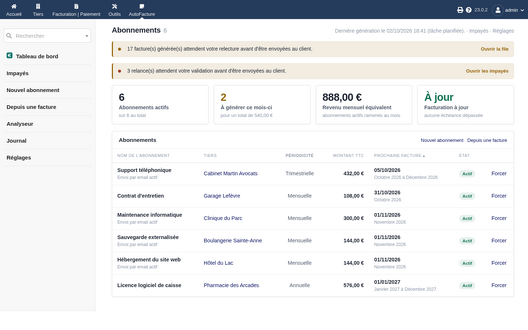
Dashboard: subscriptions, monthly equivalent revenue, next invoices, on-demand generation
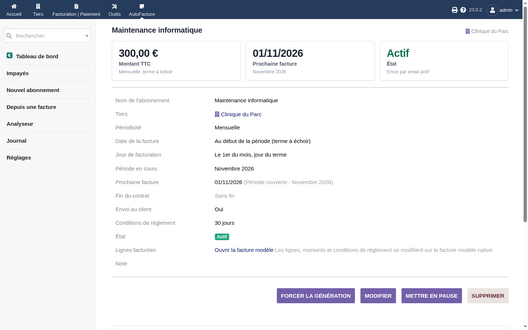
Subscription card
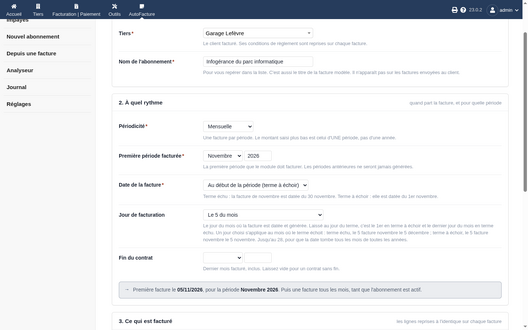
Creating a subscription, control sentence and billing day
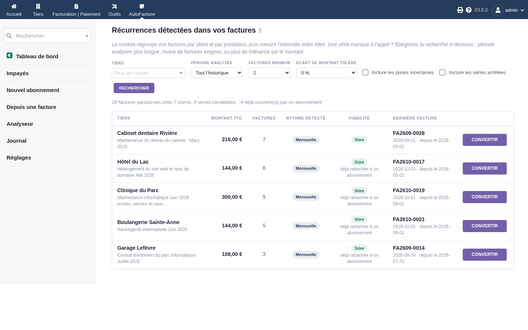
Analyzer: recurring series found among manual invoices
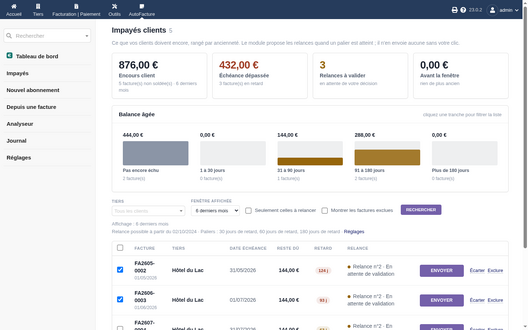
Unpaid invoices: aged balance and grouped reminders
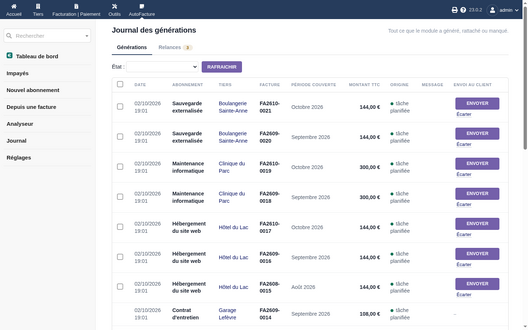
Generation journal and sending queue
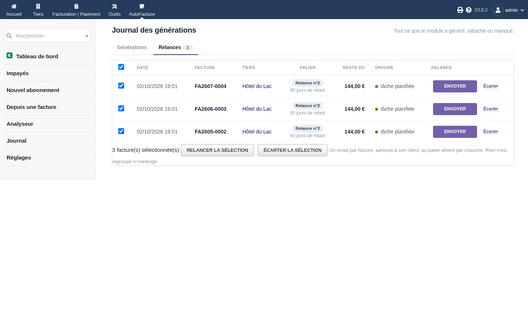
Reminders to approve, multiple selection
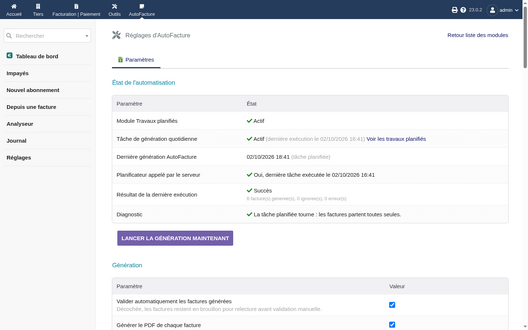
Automation status and immediate generation
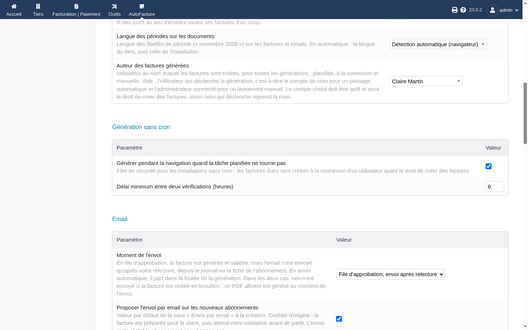
Author of generated invoices
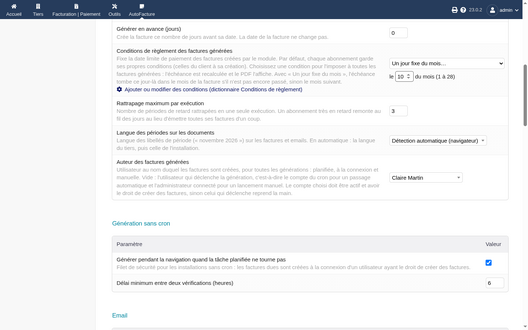
Payment terms: those of each subscription, a term from the dictionary, or a fixed day of the month
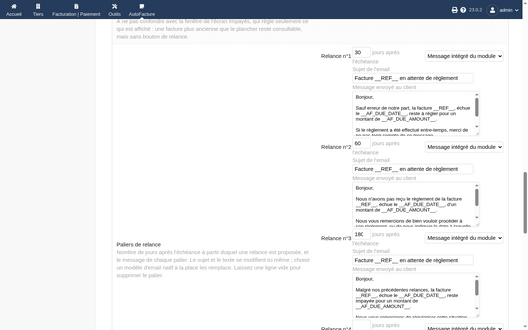
Reminder steps, editable subject and message


Support
Questions before buying, installation or update issues: write to contact@theopequignot.fr. I am the developer of this module and I answer myself. Support and updates are included for 2 years with the DoliStore purchase. The full presentation of the module, its screenshots, frequently asked questions and the support form are on modules.theopequignot.fr. Purchases are made on the DoliStore.