Module Recycle Bin

| Editor | Theo Pequignot (theopequignot.fr) |
|---|---|
| Module ID | 194153 |
| Version | 1.2.3 |
| Dolibarr | 16 to 24 |
| Where to get it | DoliStore |
| Support | contact@theopequignot.fr |
| Presentation and support | modules.theopequignot.fr |
In Dolibarr, deleting a third party, a product or an invoice is permanent. The only way back is restoring a full database backup, and the whole team loses the day's work. This module sets the deleted record aside instead of erasing it, and puts it back in one click.
Where to find the recycle bin?
Three ways in, from every page: the "Undo this deletion" link in the message after a deletion, the bin icon at the top right with the number of recoverable items, and the Tools → Recycle bin menu. A tab in the top bar can be added in the module settings (off by default since 1.2.2).

What is protected
- Ten record types: third parties, contacts, products and services, quotes, sales orders, customer invoices, projects, tasks, interventions, attached files. Each type can be switched on separately.
- The copy runs in the same transaction as the deletion: if it fails, the deletion is cancelled. Nothing goes without a copy.
One-click restore
- The record comes back with its lines, extra fields, categories, links to other objects and attached files, under its original ID when still free.
- A dry run replays every check without touching the database: reference available, linked objects present, files intact, permissions. Conflicts show up before you confirm.
- If a linked object is also in the bin, it is restored in cascade.
Always within reach
- An "Undo this deletion" link in the message that follows the deletion.
- The bin icon at the top right of every page, with the number of recoverable items.
- A bin you can filter by type, user and date, plus a dashboard.
Safeguards
- Retention per record type (30 days by default) and a daily automatic purge.
- Bulk deletions blocked or requiring a second confirmation above a threshold (25 by default).
- Log of every deletion, restore and purge (date, user, IP), exportable to CSV.
- Access rights per user and per group, set directly from the module settings.
What it does not do
- It restores the invoice, not its payments, accounting entries or stock movements. The screen says so before you confirm.
- It cannot see deletions made in direct SQL or by a module that bypasses Dolibarr triggers. The settings page lists such installed modules by name.
- It is a recycle bin, not a version history: it captures on deletion, not on every change.
- Not covered yet: supplier documents, members, shipments, contracts, expense reports, tickets.
Installation
Home → Setup → Modules → "Deploy/install external app/module", upload the zip and enable Recycle Bin. Two tables added, no core file modified.
Upgrading from a previous version: replace the files, then disable and re-enable the module (Setup → Modules). Settings, data and user permissions are kept.
Compatibility
- Dolibarr 16 to 24, tested screen by screen on every version from 16 to 23, and verified on 24.
- PHP 7.4 to 8.3, MySQL / MariaDB and PostgreSQL.
- Multi-company: every screen, counter, export and purge is scoped to the entity.
- 100% local: no external service, nothing leaves your server. English and French included. Email support and updates for 2 years.
Screenshots
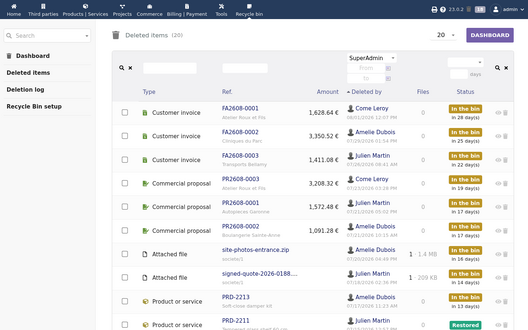
Deleted items waiting in the bin
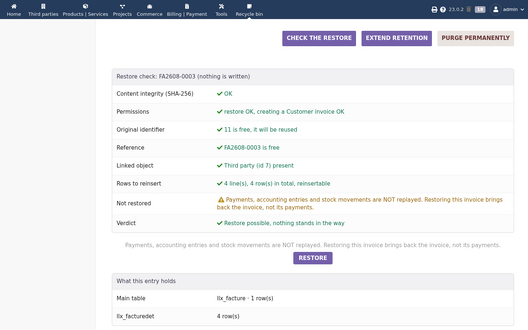
Check before restoring, nothing is written
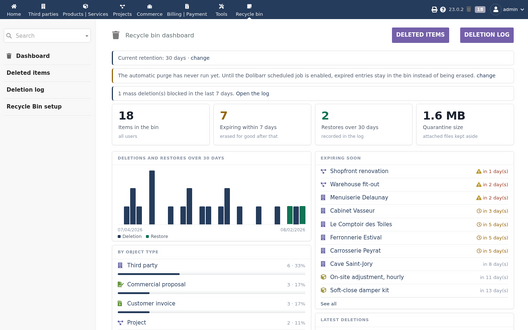
Recycle bin dashboard


Versions
- 1.2.3 (3 October 2026): on Dolibarr 16, the "view" icon of the recycle bin list was shown as a broken image.
- 1.2.2 (2 October 2026): the top bar tab becomes optional (the icon at the top right leads to the same screens), accented names fixed in messages.
Support
Questions before buying, installation or update issues: write to contact@theopequignot.fr. I am the developer of this module and I answer myself. Support and updates are included for 2 years with the DoliStore purchase. The full presentation of the module, its screenshots, frequently asked questions and the support form are on modules.theopequignot.fr. Purchases are made on the DoliStore.