Module BackupGuard

| Editor | Theo Pequignot (theopequignot.fr) |
|---|---|
| Module ID | 194158 |
| Version | 1.0.0 |
| Dolibarr | 16 to 24 |
| Where to get it | DoliStore (BackupGuard) |
| Support | contact@theopequignot.fr |
The native Dolibarr backup relies on the mysqldump command, which many shared hostings and containers do not have or refuse to run ("Failed to execute external command"). It is not scheduled, not encrypted, and stays on the same server as the data. BackupGuard makes a complete, scheduled, encrypted, verified backup and sends it elsewhere, without installing anything on the server.
What it does
- Pure PHP database dump: every Dolibarr table is read inside a consistent InnoDB snapshot (REPEATABLE READ, START TRANSACTION WITH CONSISTENT SNAPSHOT) and streamed to a SQL file, 2,000 rows at a time, grouped INSERT statements of about 1 MB. No binary needed, constant memory. When mysqldump exists and the option is enabled, it is used instead, with automatic fallback to the PHP dump.
- Documents included: the documents directory (DOL_DATA_ROOT) is added file by file to a zip, with configurable exclusions (default: temp folders, cache, .tmp files). The zip holds database.sql, manifest.json and documents/.
- AES-256-CBC encryption in the exact format of the openssl enc command (Salted__ header, PBKDF2-SHA256 10,000 iterations, PKCS7). A backup can be decrypted on any machine with:
openssl enc -d -aes-256-cbc -pbkdf2 -in backup.zip.enc -out backup.zip - Destinations, several at once: local copy (always), WebDAV (Nextcloud, ownCloud, kDrive, Infomaniak, Apache or nginx DAV), S3 compatible storage (AWS, Scaleway, OVH, Backblaze B2, Wasabi, MinIO, AWS signature v4 in pure PHP), FTP/FTPS (PHP extension ftp) and SFTP (PHP extension ssh2). Streaming uploads through curl. Each destination has a "Test connection" button that writes then deletes a witness file and shows the real error message.
- Scheduling: a daily Dolibarr scheduled job at the chosen hour (the Scheduled jobs module is enabled at installation), a CLI script for a system cron, and a URL trigger with a secret key for hostings without any cron. "Back up now" button. A lock prevents two simultaneous runs and is released even after a fatal error.
- Retention per destination: keep the N most recent backups (7 by default) plus the first backup of each month for M months (6 by default). Purge happens only after a successful upload to that destination.
- Verification and log: SHA-256 of the final file, zip integrity, end marker inside database.sql, control decryption of the first 64 KB. Every run is logged (status, size, duration, tables, rows, files, result per destination, trigger). Email alerts on failure and when no successful backup exists for N days.
- Dashboard (Tools, Backups): last successful backup, scheduling state, server diagnostic (mysqldump, extensions, disk space, estimated size), destinations, last thirty runs with download and deletion of the local file.
- Restore from the command line with the provided script: decryption, verification, SQL import statement by statement, documents extraction.
Installation
Home → Setup → Modules → "Deploy/install external app/module", upload the zip and enable BackupGuard. Activation creates the table llx_backupguard_run, the protected directory documents/backupguard, the daily scheduled job and the URL key. The first local backup works with no setting at all.
Settings
- Content: database and documents (default) or database only; exclusion patterns; use of mysqldump when available.
- Encryption: on/off and passphrase (12 characters minimum, never displayed again). Without the passphrase a backup is unreadable: keep it somewhere else than on the server.
- Destinations: one section per type with its test button. Destinations whose PHP extension is missing are shown as unavailable with the reason.
- Scheduling and retention: hour of the daily backup, real state of the scheduled job (last and next run), trigger URL with its key and a cron line example, CLI command, number of backups kept, monthly retention.
- Alerts: email address (default: first administrator), "no successful backup for N days" delay, test email.
Permissions
- Read: dashboard and log.
- Run: start a backup, download and delete local files. A backup contains the whole database: grant this right with care.
- Setup: settings (administrators only).
Restore
- Get the file dolibarr-<database>-YYYY-MM-DD-HHMM.zip.enc from a destination or the dashboard.
- Decrypt it with openssl (see above) or let the script do it (passphrase asked on the keyboard or read from the environment variable BACKUPGUARD_ENCRYPTION_PASSWORD).
- Put Dolibarr in maintenance mode, then on the target server:
php htdocs/custom/backupguard/scripts/restore.php backup.zip.enc --documents=/path/to/documents. The script verifies the archive, shows its content, asks for confirmation, imports database.sql (each table is dropped and recreated) and extracts documents/. - Clear the Dolibarr cache (documents/admin/temp) and log in again.
Known limits
- Database dump for MySQL and MariaDB only. On PostgreSQL the module says so and backs up the documents only.
- Views, triggers and stored procedures are not exported (Dolibarr creates none).
- No restore from the web interface, by design.
- FTP and SFTP depend on the PHP extensions ftp and ssh2. WebDAV: Basic authentication only (Nextcloud, ownCloud, kDrive, Apache mod_dav).
- Encryption protects the remote copy, not the server itself: whoever reads the Dolibarr configuration reads the passphrase.
Compatibility
- Dolibarr 16 to 24, verified on 16.0, 18.0, 20.0, 22.0, 23.0 and 24.0.
- PHP 7.4 to 8.4. Extensions zip, openssl and curl required; ftp and ssh2 depending on the destination.
- English and French included.
Screenshots
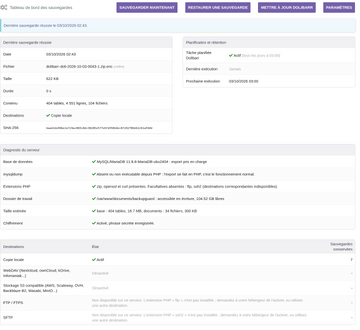
Dashboard after a successful backup
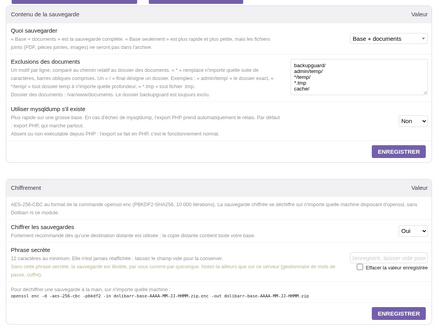
Settings: content and encryption
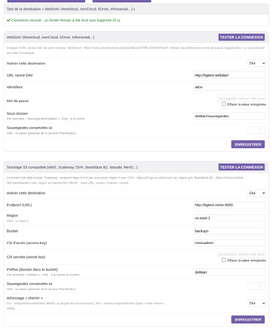
Destinations with the connection test
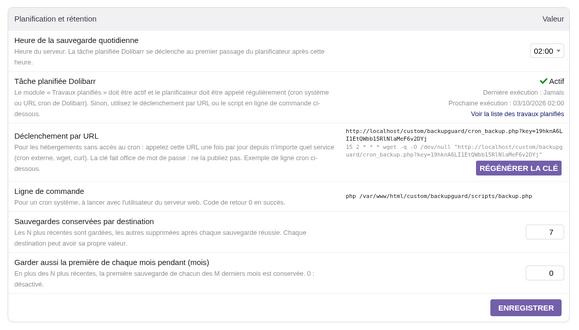
Scheduling, URL trigger and retention


Support
Questions before buying, installation or update issues: write to contact@theopequignot.fr. I am the developer of this module and I answer myself. Support and updates are included for 2 years with the DoliStore purchase.