Module Capcompta: Difference between revisions
Eric.seigne (talk | contribs) (Capcompta 1.2.0) |
Eric.seigne (talk | contribs) (Capcompta 1.3.0) |
||
| Line 59: | Line 59: | ||
* [https://doc.cap-rel.fr/capcompta/?lang=en Module documentation] | * [https://doc.cap-rel.fr/capcompta/?lang=en Module documentation] | ||
* [https://doc.cap-rel.fr/capcompta/nouveautes-1- | * [https://doc.cap-rel.fr/capcompta/nouveautes-1-3-0 What's new in version 1.3.0] | ||
* [https://dolinews.com/en/projets/capcompta Get update notifications] | * [https://dolinews.com/en/projets/capcompta Get update notifications] | ||
* [https://cap-rel.fr/sav-module-dolibarr/ Support form] | * [https://cap-rel.fr/sav-module-dolibarr/ Support form] | ||
* [https:// | * [https://tests.cap-rel.fr/projects/31/quality Automated test report] | ||
* [https://dolitry.fr/capcompta/ Online demo]: a Dolibarr with a complete demonstration bookkeeping, created for you in less than 20 seconds and deleted after the session | |||
=Requirements= | =Requirements= | ||
| Line 94: | Line 95: | ||
==Demonstration data== | ==Demonstration data== | ||
The '''Demonstration''' page of the module generates, then purges, two fiscal years of a | The '''Demonstration''' page of the module generates, then purges, two fiscal years of a consulting firm of some fifty employees run through every native journal, with a guided tour of each screen. It is meant for a test or presentation instance: generation is only allowed on a development instance or one declared as a demonstration instance. | ||
=Permissions= | =Permissions= | ||
Latest revision as of 22:23, 27 October 2026


Information
| Module name | Capcompta |
| Editor / Editeur | CAP-REL - www.cap-rel.fr |
| Download or buy page / Page achat ou téléchargement | External module - www.dolistore.com |
| Status / Statut / Estado | Stable |
| Prerequisites / Prérequis | Double-entry accounting and SmartAuth modules enabled
Dolibarr min version: See on Dolistore Dolibarr max version: See on Dolistore |
| Last update date / Date mise à jour fiche / Fecha última actualización | 2026-10-27 |
| Note / Nota | Prototype of an expert interface for accountants: binding, journals, ledger and lettering, miscellaneous entries, bank reconciliation, FEC exports and year-end closing, entirely on the keyboard, on top of the native accounting module. |
Features
capcompta is built for accountants. It shows that an interface as expert as the one of dedicated accounting firm software can live natively in Dolibarr: everything on the keyboard, dense grids, no page reload, and the Dolibarr accounting engine intact, with its tables and its permissions. It is a prototype in the sense that it is built with the people who use it: it already covers the complete accounting cycle, and your feedback as an accountant shapes the next versions.
At a glance
- For whom: the person who actually keeps the books, several hours a day in the same screens, and the firms that support them.
- What the module does: it replaces the accounting screens of Dolibarr with a keyboard workspace, and leaves every accounting calculation to the native engine.
- What it does not do: neither tax return forms nor intermediate management balances, and it does not replace the accountant: it prepares a clean FEC and reads back the one returned to you.
Feature list
- Guided setup - check of the chart of accounts, journals, default accounts and fiscal year, with the action that fixes each gap.
- Binding of sales, purchases and expense reports - account proposed by the Dolibarr engine, accepted with one key or replaced by typing its number, assignment of a whole selection, remembered on the product or the third party.
- Journals and transfer - preview of each journal, blocking documents named, transfer protected against double writing.
- General ledger and trial balance - running balance, account and amount filters, general and subsidiary trial balance grouped by class.
- Lettering - full, partial and automatic, in a panel next to the ledger.
- Miscellaneous entries - a batch typed in a grid, counterpart proposed, balance checked, draft kept.
- Bank reconciliation - ticking against the statement, reconciled balance always on screen.
- Financial statements - income statement and balance sheet by main headings.
- FEC exports - with an optional archive of supporting documents named after their entry number.
- Reconciliation of the accountant's FEC - added, changed or removed lines, and added movements written with one key.
- Year-end closing - prior checks, result entry and opening entries.
- Takeover of an existing file - opening trial balance pasted from a spreadsheet, missing accounts created in one go.
Screenshots
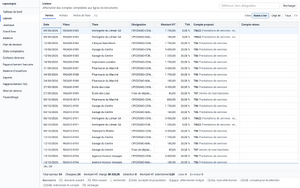
Sales binding: the account proposed for each line, accepted with one key
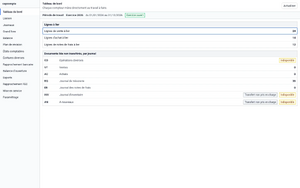
Dashboard: lines to bind and documents to transfer, journal by journal
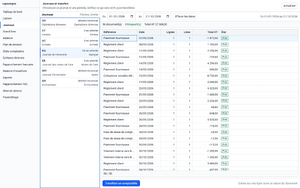
Preview of the bank journal before the transfer
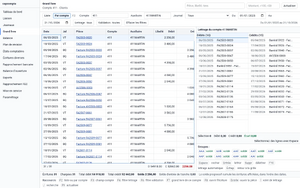
Ledger of a customer with its lettering panel
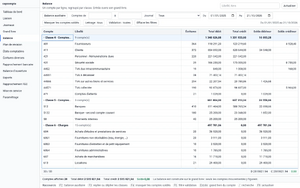
General trial balance grouped by class
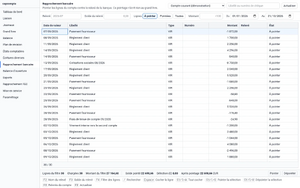
Bank reconciliation against the statement
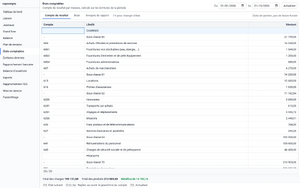
Income statement by main headings
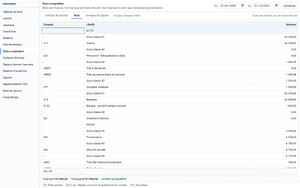
Balance sheet by main headings
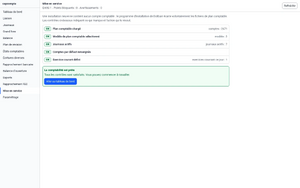
Setup: the checks and the action that fixes each gap


Links
- Module documentation
- What's new in version 1.3.0
- Get update notifications
- Support form
- Automated test report
- Online demo: a Dolibarr with a complete demonstration bookkeeping, created for you in less than 20 seconds and deleted after the session
Requirements
- Dolibarr 18, PHP 7.4 or newer.
- Double-entry accounting module enabled: capcompta is an interface to it, not a replacement.
- SmartAuth module enabled, for the authentication of the interface.
- A workstation with a keyboard and a wide screen: capcompta is not designed for phones or touch screens.
Installation
- Download archive file of module (.zip file) from web site www.dolistore.com or from any other source.
- Install module into the /custom folder of Dolibarr:
- Go to Home - Setup - Modules - Deploy/install external app/module
- Upload the file. Note: If it fails because upload from this page has been locked by your web hosting provider, you can manually unzip the file into the /custom directory from command line: Go into the /custom directory and uncompress file with command unzip modulefile.zip then check that the directory with the nameof the module is inside the /custom directory. If into a subdirectory, just move it into /custom.
- Module should be ready to be activated and used.
Update
- Install the new version through Home > Setup > Modules/Applications > Deploy/Install external module.
- Disable then enable the module again when the release notes of the version ask for it: this declares the new functions of the interface.
Accounting entries and settings are not touched.
Uninstall
Disable the module from Home > Setup > Modules/Applications. capcompta creates no table: every entry stays in the native accounting of Dolibarr.
Setup
To use this module, you must first enable it using an administrator account, via the menu option "Home - Setup - Modules".
Choose the tab where the module is listed. Then click on "Activate".
The module is now activated.
If a cog icon appears  on module thumb or at end of the line of the module, click on it to access the setup page specific to the module.
The workspace opens on the Setup screen as long as the accounting is not ready: chart of accounts, journals, default accounts and current fiscal year. Accounting settings stay those of the native module. The page Home > Setup > Modules > capcompta only holds interface options and the optional connection to the Bernard suggestion service.
Demonstration data
The Demonstration page of the module generates, then purges, two fiscal years of a consulting firm of some fifty employees run through every native journal, with a guided tour of each screen. It is meant for a test or presentation instance: generation is only allowed on a development instance or one declared as a demonstration instance.
Permissions
capcompta declares no permission of its own: it relies entirely on the permissions of the double-entry accounting module, and opens to nobody what the native module would refuse.
Usage
The capcompta menu opens the workspace. Every screen is driven from the keyboard and shows its shortcuts in its footer; the working period is shared by all screens. Each screen is described in the documentation.
FAQ
The capcompta menu does not appear.
Check, in this order, that the capcompta module is enabled, that the double-entry accounting module is enabled too, and that the user holds at least one read permission on accounting.
After an update, an action answers "access denied".
Disable then enable capcompta again: this refreshes the declaration of the interface calls. Your data is not touched.
All questions: documentation FAQ.
Development
Developments and improvements can be proposed to the project leader by email (see the headers of the source files) or through the support form.