Module PDF Protect: Difference between revisions
PolyglotBot (talk | contribs) m (Adding interlang links (links to translated versions of this page in other languages) triggered by origin English page "Module_PDF_Protect_FR" update.) |
PolyglotBot (talk | contribs) m (Updating interlang links (links to translated versions of this page in other languages) triggered by origin English page "Module_PDF_Protect_FR" update.) |
||
| Line 3: | Line 3: | ||
Links below are automatically managed by PolyglotBot | Links below are automatically managed by PolyglotBot | ||
You can edit links on the English source page : Module_PDF_Protect_FR --> | You can edit links on the English source page : Module_PDF_Protect_FR --> | ||
<!-- END interlang links --> | <!-- END interlang links --> | ||
Revision as of 00:29, 2 October 2026

| Editor | Theo Pequignot (theopequignot.fr) |
|---|---|
| Module ID | 194156 |
| Version | 5.12.0 |
| Dolibarr | 14 to 24 |
| Where to get it | DoliStore |
| Support | contact@theopequignot.fr |
A quote sent as a PDF can be copied, edited and sent back under another name. PDF Protect automatically locks quote and invoice PDFs as soon as Dolibarr generates them.
What it does
- Automatic protection on every PDF generation, for quotes, invoices or both.
- Opens freely by default: your customer opens the document with a double-click, but editing, extraction and assembly are blocked. Printing and text copying are allowed or not, your choice.
- Optional opening password: the PDF is then truly encrypted and unreadable without it.
- Works with online signature: your customer can sign the protected quote online, then both the original and the signed PDF are protected again.
- Works with bulk merge: the "Generate document" bulk action on quote and invoice lists keeps working.
- Audit log of every protected document, built-in settings page.
Nothing to install on the server
The built-in engine (AES-256) runs everywhere, including the official Dolibarr Docker image. If your server has qpdf, pikepdf, GhostScript or pypdf, the module can use them too.
Good to know
- Without an opening password, copy and edit restrictions are honored by common readers (Adobe Acrobat, Foxit…), but a specialised tool can remove them. For real confidentiality, set an opening password.
- Factur-X PDFs (with an embedded XML file) are protected with qpdf or pikepdf; with the built-in engine they are left as they are so the XML is not lost.
- An encrypted PDF is no longer PDF/A compliant.
Installation
Home → Setup → Modules → "Deploy/install external app/module", upload the zip, enable PDF Protect and tick the documents to protect.
Upgrading from a previous version: replace the files, then disable and re-enable the module (Setup → Modules). Settings, data and user permissions are kept.
Compatibility
- Dolibarr 14 to 24 (verified on 16, 23 and 24, including Docker).
- PHP 7.4 to 8.4, MySQL / MariaDB.
- English and French included. Email support and updates for 2 years.
Screenshots
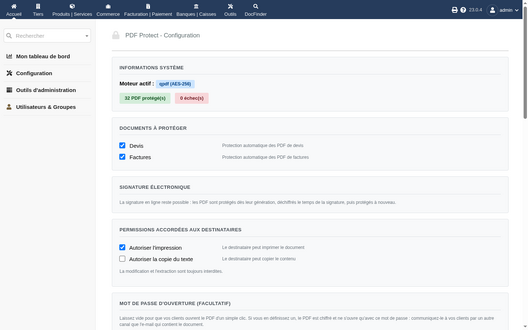
Settings: documents, permissions, engine
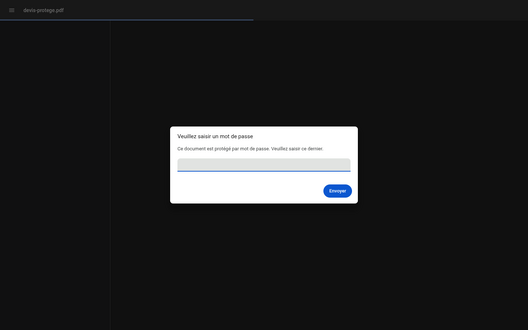
A quote protected with an opening password
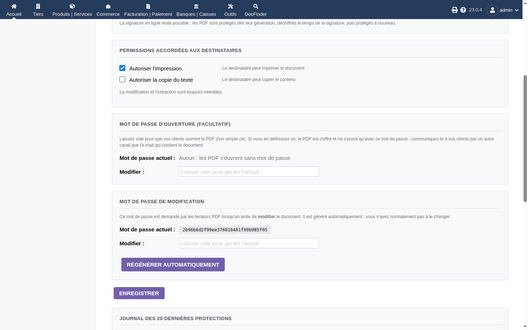
Opening and edit passwords


Support
Questions before buying, installation or update issues: write to contact@theopequignot.fr. I am the developer of this module and I answer myself. Support and updates are included for 2 years with the DoliStore purchase.