Module PDF Protect

| Editor | Theo Pequignot (theopequignot.fr) |
|---|---|
| Module ID | 194156 |
| Version | 5.13.0 |
| Dolibarr | 14 to 24 |
| Where to get it | DoliStore |
| Support | contact@theopequignot.fr |
| Presentation and support | modules.theopequignot.fr |
A quote sent as a PDF can be copied, edited and sent back under another name. PDF Protect automatically locks quote and invoice PDFs as soon as Dolibarr generates them.
What it does
- Automatic protection on every PDF generation, for quotes, invoices or both.
- Opens freely by default: your customer opens the document with a double-click, but editing, extraction and assembly are blocked. Printing and text copying are allowed or not, your choice.
- Optional opening password: the PDF is then truly encrypted and unreadable without it.
- Works with online signature: your customer can sign the protected quote online, then both the original and the signed PDF are protected again.
- Signature placed in the box: your customer's online signature lands in the "Bon pour accord" box of the quote, even when that box moves up or down from one document to the next (InfraS PackPlus templates included), and the "Signature: date - name" line stays readable. When no box is recognized, Dolibarr keeps its usual position.
- Works with bulk merge: the "Generate document" bulk action on quote and invoice lists keeps working.
- Audit log of every protected document, built-in settings page.
Nothing to install on the server
The built-in engine (AES-256) runs everywhere, including the official Dolibarr Docker image. If your server has qpdf, pikepdf, GhostScript or pypdf, the module can use them too.
Good to know
- Without an opening password, copy and edit restrictions are honored by common readers (Adobe Acrobat, Foxit…), but a specialised tool can remove them. For real confidentiality, set an opening password.
- Factur-X PDFs (with an embedded XML file) are protected with qpdf or pikepdf; with the built-in engine they are left as they are so the XML is not lost.
- An encrypted PDF is no longer PDF/A compliant.
Installation
Home → Setup → Modules → "Deploy/install external app/module", upload the zip, enable PDF Protect and tick the documents to protect.
Upgrading from a previous version: replace the files, then disable and re-enable the module (Setup → Modules). Settings, data and user permissions are kept.
Compatibility
- Dolibarr 14 to 24 (verified on 16, 23 and 24, including Docker).
- PHP 7.4 to 8.4, MySQL / MariaDB.
- English and French included. Email support and updates for 2 years.
Screenshots
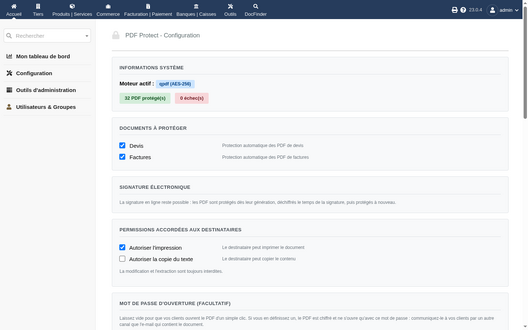
Settings: documents, permissions, engine
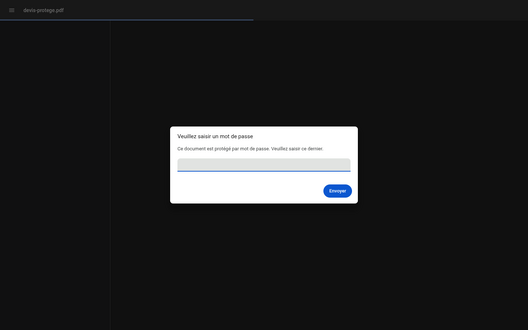
A quote protected with an opening password
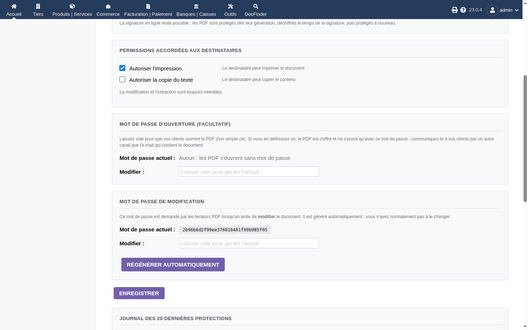
Opening and edit passwords


Support
Questions before buying, installation or update issues: write to contact@theopequignot.fr. I am the developer of this module and I answer myself. Support and updates are included for 2 years with the DoliStore purchase. The full presentation of the module, its screenshots, frequently asked questions and the support form are on modules.theopequignot.fr. Purchases are made on the DoliStore.