Module Dunning EN: Difference between revisions
Jump to navigation
Jump to search
Gschratzer (talk | contribs) No edit summary |
Gschratzer (talk | contribs) |
||
| Line 41: | Line 41: | ||
Don't forget the user rights! | Don't forget the user rights! | ||
= | = Existing Status Messages = | ||
* status 7: [[File:Statut7.png]] | |||
** Category: due in some days | |||
** not remind | |||
** Payment period is exceeded in the foreseeable future | |||
** not to remind! | |||
* status 0: [[File:Statut0.png]] | |||
** Category: actual due | |||
** not reminded | |||
** Payment deadline expired | |||
** dunning is to create | |||
* status 4: [[File:Statut4.png]] | |||
** Category: Payment Open | |||
** reminder was send | |||
** within the new payment due date | |||
** don't create dunning! | |||
* status 3: [[File:Statut3.png]] | |||
** Category: bald Ausstehend, Offen | |||
** reminder was send | |||
** new payment deadline is exceeded shortly | |||
** don't create dunning! | |||
* status 1: [[File:Statut1.png]] | |||
** Kategorie: Ausstehend, Offen | |||
** reminder was send | |||
** new payment deadline expired | |||
** dunning is to create | |||
* status 5: [[File:Statut5.png]] | |||
** Category: closed | |||
** reminder was send | |||
** not paid, new reminder is created. | |||
** not suitable for dunning! | |||
* status 6: [[File:Statut6.png]] | |||
** Category: closed | |||
** reminder was send | |||
** get payment | |||
** not suitable for dunning! | |||
Revision as of 16:29, 27 February 2013


| Dunning | |
|---|---|
| Numero/ID of module | 52222 |
| User doc. of module | This page |
| Developer doc. of module | Module Dunning (developer) |
Introduction
The dunning module is a tool which allows you to create a list of all open invoices as PDF.
- - 5 dunning levels are possible
- send PDF (optional including open invoices) as email
- To add date for open invoices (don't send rappel to date)
Installation
easy see INSTALL Document in module package
Configuration

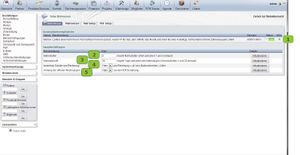
To use this module, you must first enable it. For this, with an administrator account, go on page "Home - Setup - Modules". Choose the tab where the module stand. Then click on "Activate".
If an icon appears at end of module line, click on it to access the setup page, specific to this module.
- 1) Number Model (you must select it)
- 2) Dunning Level (Number between 1 and 5 possible)
- 3) Dunning Period in Days (Number between 1 and 30 possible)
- 4) Calculation of Charge (per invoice or per dunning)
- 5) add all invoices (pdf) on bottom of dunning pdf
The module should be ready to be use.
Don't forget the user rights!
Existing Status Messages
- status 7: File:Statut7.png
- Category: due in some days
- not remind
- Payment period is exceeded in the foreseeable future
- not to remind!
- status 0:

- Category: actual due
- not reminded
- Payment deadline expired
- dunning is to create

- status 4:

- Category: Payment Open
- reminder was send
- within the new payment due date
- don't create dunning!

- status 3:

- Category: bald Ausstehend, Offen
- reminder was send
- new payment deadline is exceeded shortly
- don't create dunning!

- status 1:

- Kategorie: Ausstehend, Offen
- reminder was send
- new payment deadline expired
- dunning is to create

- status 5:

- Category: closed
- reminder was send
- not paid, new reminder is created.
- not suitable for dunning!


- status 6: File:Statut6.png
- Category: closed
- reminder was send
- get payment
- not suitable for dunning!
