SOP & Document Control Pro
SOP & Document Control Pro is a Dolibarr module for controlled SOP and document lifecycle management.
It provides structured document creation, review, approval, controlled revisions, employee training acknowledgements, notifications, workflow history, QR access to the current effective revision and PDF reporting.
The module is designed for laboratories, pharmaceutical, cosmetic, food, manufacturing and other quality-controlled organizations that require traceable document management and separation of responsibilities.

Main features
- Controlled SOP and document lifecycle management
- Automatic document references
- Configurable document reference pattern
- Draft, Review, Approval, Effective and Obsolete document states
- Role-based Author, Reviewer and Approver permissions
- Controlled document revisions
- Revision reason and change summary
- Workflow history and traceability
- Controlled Effective Version management
- QR access to the current Effective revision
- Review due-date monitoring
- Review overdue alerts
- Employee training assignments
- Read & Understood acknowledgement
- Training due dates and completion tracking
- Pending, Overdue, Completed and Superseded training statuses
- Internal notifications
- Optional e-mail notifications
- Master Document List
- Training Status Report
- Individual document PDF export
- PDF report generation
- Dedicated module configuration
- Responsive desktop and mobile interface
Document lifecycle
The module implements the following controlled workflow:
Draft → Pending Review → Pending Approval → Approved → Effective → Obsolete
Each stage is protected by dedicated permissions.
A document can be returned to Draft during Review or Approval when corrections are required.
Only authorized users can perform workflow actions corresponding to their role.

Controlled Effective Version
When a document becomes Effective, the module creates a controlled Effective revision.
The Effective revision includes:
- document reference;
- version;
- effective date;
- next review date;
- controlled revision information;
- QR access to the current Effective document.
The QR code allows authorized users to access the current controlled revision without relying on obsolete printed copies or outdated document links.

Workflow history and traceability
Each important document lifecycle action is recorded in the workflow history.
The history can show:
- document creation;
- submission for review;
- review approval;
- rejection to Draft;
- approval;
- transition to Effective;
- transition to Obsolete;
- responsible user;
- date and time;
- status transition.
Historical actor display information can also be preserved when old Dolibarr user accounts have been deleted or recreated.

Training management
Effective document revisions can be assigned to Dolibarr users for training and acknowledgement.
Training records include:
- controlled revision;
- assigned user;
- assignment date;
- due date;
- training status;
- acknowledgement date;
- e-mail delivery status.
Users can acknowledge training using the I HAVE READ AND UNDERSTOOD action.
Training assignments remain linked to the controlled document revision against which they were issued.

Training statuses
The module tracks the following training states:
- Pending
- Overdue
- Completed
- Superseded
When a controlled document revision is replaced, historical training records can remain visible for traceability.
Notifications
The module provides internal notifications for document and training events.
Optional e-mail copies can also be enabled through module configuration.
Notification information includes delivery status so administrators can identify cases where:
- an e-mail was sent;
- delivery failed;
- no e-mail address was available;
- no e-mail was sent.

Reports
Master Document List
The Master Document List provides a centralized overview of controlled documents.
Typical information includes:
- document reference;
- title;
- document type;
- current version;
- current status;
- effective date;
- next review date.
The report can also be exported to PDF.

Training Status Report
The Training Status Report provides an overview of current and historical document training assignments.
The report includes KPI indicators for:
- Pending;
- Overdue;
- Completed;
- Superseded.
It also provides detailed assignment information for each user and document revision.

A PDF version of the Training Status Report is also available.

Role-based permissions
SOP & Document Control Pro provides separate permissions for different responsibilities.
Available permissions are:
- Read SOP documents
- Create and modify Draft documents
- Review documents
- Approve documents
- Manage training acknowledgements
- View reports
- Administer SOP Document Control Pro
This permission model allows organizations to separate responsibilities between Authors, Reviewers, Approvers, Training Managers, Report users and Module Administrators.
A user with module administration permission can access the module configuration without requiring global Dolibarr administrator rights.
Configuration
The module Configuration page allows authorized administrators to define settings including:
- document reference pattern;
- default review interval;
- default training due interval;
- review due warning window;
- training due warning window;
- internal notifications;
- e-mail notification copies;
- historical workflow actor display mapping.

Responsive interface
The module is designed for use on desktop computers, tablets and mobile devices.
Document information, controlled revisions, QR access, notifications and workflow information adapt to smaller screens.
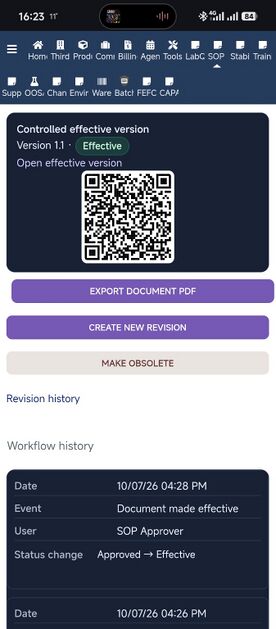
Controlled Effective Version and QR access on mobile
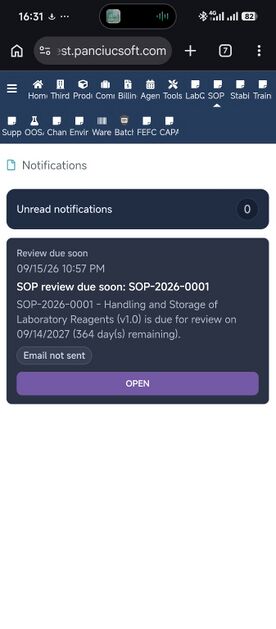
Notifications on mobile


Installation
- Download the SOP & Document Control Pro package.
- Back up the Dolibarr database before upgrading an existing installation.
- Install or extract the module into the Dolibarr custom modules directory.
- Open Home → Setup → Modules/Applications.
- Enable SOP & Document Control Pro.
- Open the module Configuration page.
- Configure the required module parameters.
- Assign the required permissions to users or user groups.
Upgrade from previous versions
Upgrade from 1.0.71
Replace the existing module files with version 1.1.0.
No module deactivate/reactivate cycle is required when upgrading directly from 1.0.71.
Upgrade from an earlier 1.0.x version
When upgrading from a version earlier than 1.0.71:
- Back up the Dolibarr database and the existing module directory.
- Replace the module files with version 1.1.0.
- Disable and re-enable the module once so Dolibarr refreshes menus and permission definitions.
- Review user and group permissions.
- Verify the document workflow and Training functions before returning the module to normal production use.
Upgrade from 1.0.36 or earlier
Version 1.0.37 migrated the module to the reserved Dolibarr module ID:
210133
Current permission IDs are:
- 21013301 – Read SOP documents
- 21013302 – Create and modify Draft documents
- 21013303 – Review documents
- 21013304 – Approve documents
- 21013305 – Manage training acknowledgements
- 21013306 – View reports
- 21013307 – Administer SOP Document Control Pro
Existing installations from version 1.0.36 or earlier should follow the module-ID migration instructions included in the module package.
The document, revision, training, notification and audit tables are preserved during the migration.
Requirements
- Dolibarr: 24.x
- PHP: 7.4 or later
- A configured Dolibarr e-mail service is required only when e-mail notification copies are enabled.
What's new in version 1.1.0
Version 1.1.0 is a major workflow, permissions, interface and reporting update.
Main improvements include:
- validation of the complete controlled document workflow;
- validated Author, Reviewer and Approver permission profiles;
- improved role-based menu and action visibility;
- dedicated Configuration access for module administrators;
- improved desktop and mobile layouts;
- improved Workflow History presentation;
- improved Training assignment and acknowledgement workflow;
- improved handling of users without e-mail addresses;
- preservation of historical training identities;
- synchronized Training Status Report KPIs, web results and PDF output;
- improved Master Document List report;
- improved document and training PDF exports;
- improved notification status presentation;
- Controlled Effective Version and QR access improvements.
Current version
1.1.0
Release date: 18 October 2026
Support
For technical support:
E-mail: support@panciucsoft.com
The module is commercially available on DoliStore.
DoliStore product ID: 3519
Compliance note
SOP & Document Control Pro provides workflow controls, permissions, traceability, document revision management and training records that can support a regulated quality-management environment.
Use of the module does not by itself constitute certification or formal compliance with a specific regulatory framework such as FDA 21 CFR Part 11.
Organizations remain responsible for system configuration, validation, procedures, user management, infrastructure and applicable regulatory requirements.