Module ProcureMatch Pro
ProcureMatch Pro is a supplier purchase matching and discrepancy-review module for Dolibarr ERP/CRM, developed by PanciucSoft. It compares supplier purchase orders, goods receipts and explicitly linked supplier invoices to help users identify quantity and price differences before taking business decisions.

Module information
| Item | Details |
|---|---|
| Module name | ProcureMatch Pro |
| Version | 1.0.0 Stable |
| Module ID | 207605 |
| Publisher / author | PanciucSoft / Vasile Panciuc |
| Dolibarr compatibility | V23–V24 |
| Minimum declared PHP version | 7.4 |
| Interface languages | English, Romanian, German, French, Spanish |
| License | GNU GPL v3 or later |
| Support | PanciucSoft Support – support@panciucsoft.com |
Main features
- 2-way matching: compare supplier purchase orders with linked supplier invoices.
- 3-way matching: compare ordered, received and invoiced product quantities when receipt data is available.
- Compare effective net unit prices with a configurable price tolerance.
- Display both invoice-minus-order and invoice-minus-received quantity differences.
- Analyze a single supplier invoice or the combined effect of multiple invoices linked to an order.
- Identify exact matches, tolerated differences, partial situations, mismatches, cases requiring review and cases awaiting an invoice.
- Warn about possible duplicate supplier invoice references.
- Flag credit notes, deposits, abandoned invoices, cross-currency cases and other exceptional documents for manual review rather than automatically treating them as matches.
- Allow authorized internal managers to allocate shared supplier invoice lines to eligible linked purchase orders.
- Keep an audit history of allocation changes, including user, date and before/after quantities.
- Use role-based permissions and Dolibarr supplier-visibility restrictions.
- Provide responsive pages for desktop, tablet and mobile browsers.
How it works
- Open the ProcureMatch Pro dashboard and select a supplier purchase order.
- Review the supplier invoice or invoices explicitly linked to that order in Dolibarr.
- Run the comparison to inspect ordered, received and invoiced quantities, plus net unit prices.
- Review the result and the corresponding explanations for each product.
- If an invoice is shared among several purchase orders, an authorized manager can allocate its lines and inspect the allocation audit trail.
Matching result statuses
| Status | Meaning |
|---|---|
| MATCH | Comparison is consistent, including differences explicitly accepted within configured tolerances. |
| PARTIAL | A legitimate incomplete purchase or invoice situation is detected. |
| MISMATCH | A significant quantity or price discrepancy requires attention. |
| REVIEW | Automatic matching is not reliable for the selected documents; manual inspection is required. |
| AWAITING | The selected comparison has no supplier invoice to evaluate. |
The overall status depends on the full document context, not only an individual product row. A draft, exceptional invoice, partial multi-invoice selection or incomplete shared-invoice allocation may prevent a final automatic MATCH.
When one supplier invoice is linked to several supplier purchase orders, ProcureMatch Pro requires explicit allocation of the invoice lines before allowing an automatic per-order comparison. Managers with the dedicated permission can record the quantities assigned to each eligible order.
The module checks for over-allocation, unrelated orders, mismatched products and changed or outdated allocation data. It keeps a history of successful allocation changes and requires renewed review when relevant source invoice data changes. Allocation records are internal to ProcureMatch Pro: they do not modify the Dolibarr invoice, purchase order or stock.
Screenshots


Successful comparison with a price difference within tolerance
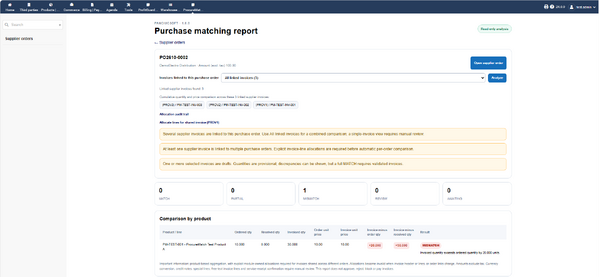
Detection of invoiced-quantity discrepancies

Conservative review of multiple invoices and credit notes
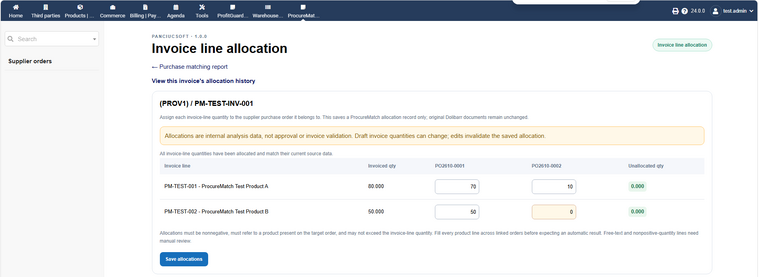
Manager allocation of shared supplier invoice lines

Allocation audit history with before/after quantities
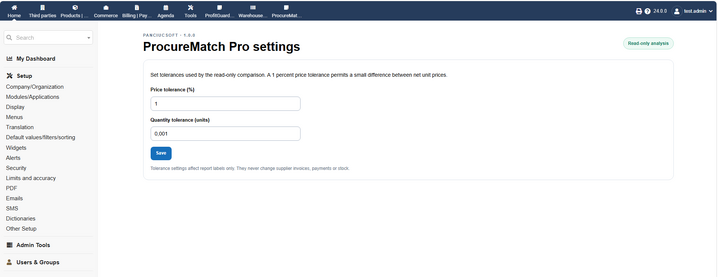
Administrative price and quantity tolerances


Compatibility and requirements
- Designed for Dolibarr 23.x and 24.x.
- Functional application tests completed on Dolibarr 23.0.4 and 24.0.0. Other patch versions were not separately regression-tested.
- Declared minimum PHP version: 7.4. The release's code lint and automated PHP checks were run with PHP 8.5.12 on Windows; PHP 7.4 was not independently regression-tested in that environment.
- Uses existing Dolibarr supplier purchase orders and supplier invoices. Receipt comparison depends on available Dolibarr reception data and stock configuration.
- Supplier invoices must be linked to the appropriate supplier purchase order in Dolibarr to appear in the selection.
Installation
- Download the ProcureMatch Pro module archive from DoliStore.
- In Dolibarr, open Home → Setup → Modules/Applications → Deploy/install external app/module. Upload the ZIP archive.
- Alternatively, unpack the archive so that its module directory is
htdocs/custom/procurematchpro/. - Enable ProcureMatch Pro in the modules list.
- Give appropriate internal users the Read purchase matching reports permission. For restricted readers, configure their supplier visibility in Dolibarr.
- Grant Manage invoice line allocations separately to trusted internal managers when needed.
- As an administrator, configure price and quantity tolerances in the module setup page.
Important limitations
- ProcureMatch Pro is a decision-support and discrepancy-analysis tool. It does not approve, reject, block, pay or modify supplier invoices, nor does it create stock movements.
- Credit notes, deposits, nonstandard invoice types, mixed currencies and certain ambiguous invoice lines may require manual verification.
- It does not automatically convert currencies, reconcile taxes or shipping charges, or prove that an invoice was paid twice.
- Supplier invoices not explicitly linked to a selected purchase order are not automatically discovered solely because they belong to the same supplier.
- This release is not a formal validation or certification for regulated environments.
Version history
Version 1.0.0 – 29 October 2026
First stable release, following functional testing on Dolibarr 23.0.4 and 24.0.0. Includes 2-way/3-way quantity and price review, cumulative linked-invoice analysis, configurable tolerances, shared-invoice allocations, allocation audit history, visibility restrictions, responsive pages and five interface languages.
Support and links
- Support: PanciucSoft Support
- Contact: support@panciucsoft.com
- Publisher: PanciucSoft