Module CapAgenda


Information
| Module name | Capagenda |
| Editor / Editeur | CAP-REL - www.cap-rel.fr |
| Download or buy page / Page achat ou téléchargement | External module - www.dolistore.com |
| Status / Statut / Estado | Stable |
| Prerequisites / Prérequis | Agenda module
Dolibarr min version: See on Dolistore Dolibarr max version: See on Dolistore |
| Last update date / Date mise à jour fiche / Fecha última actualización | 2026-10-27 |
| Note / Nota | Another view for your Dolibarr agenda: a single modern page with day, week, month, list and per-colleague planning views, drag and drop and remembered filters, without changing your events. |
Features
The native Dolibarr agenda does the job, but moving an appointment, switching views or finding a colleague's events takes many clicks. CapAgenda replaces it with a single, fast and readable page, in the spirit of the online calendars everybody knows.
At a glance
- For whom: any team that organises its appointments, calls, interventions and meetings in Dolibarr, from sales people to technicians and assistants.
- What the module does: it shows and edits the events of the Agenda module in a modern interface, with the views, filters and shortcuts of an online calendar.
- What it does not do: it creates no table and copies no event; reminders, triggers and the modules hooked on the agenda keep working. It calls no external service: the calendar library ships inside the module.
Feature list
- One page, every view - day, week, month, list and per-colleague planning; the last view used is remembered for each user.
- Full width - the Dolibarr left menu is hidden on the agenda (option on by default), a foldable side panel gathers the Create button, a mini month and the filters.
- Drag and drop - move an appointment, change its duration from its bottom edge, reassign it by dragging it from one planning line to another.
- Quick creation - select a time slot, search the third party and the project by name or reference, then go on to the native card for notes, reminders and contacts.
- Colleagues as colored boxes - each colleague has a box in the color of their events, with the Me, My team and All shortcuts.
- Soft colors - events in pastel tints, by colleague or by event type, taken from the user cards and the event type dictionary.
- Remembered filters - calendars (my events, the others', leaves, birthdays, iCal calendars, other modules), types, status, third party, project and resource.
- Statuses and undo - status 0, 50 or 100 % from the detail panel, undo of the last change for a few seconds, protection against simultaneous changes.
- Keyboard shortcuts - navigation, view switching, creation, filters and undo from the keyboard.
- Dark mode, mobile and printing - the theme follows Dolibarr, the display fits phones, printing drops the toolbars.
- Native agenda takeover - as an option, the native calendar pages redirect to CapAgenda; the native list view stays available.
- Seven languages - French, English, German, Spanish, Italian, Dutch and Portuguese (Brazil).
Screenshots
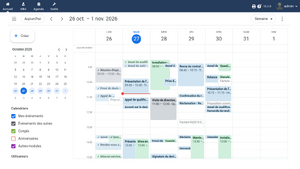
Week view: side panel, mini month and colleagues as colored boxes
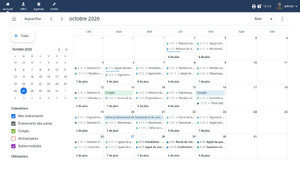
Month view: one colored dot per appointment, leaves as bars
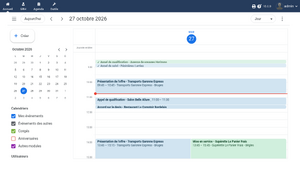
Day view
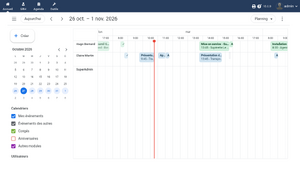
Per-colleague planning
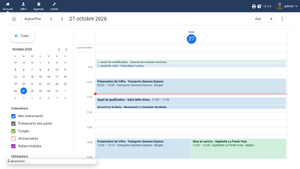
Detail panel of an event
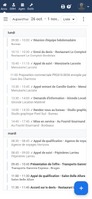
Phone display


Links
- Module documentation
- What's new in version 1.0.0
- Get update notifications
- Support form
- Automated tests report
- Online demo: a Dolibarr with a team agenda already filled over the whole month, created for you in less than 20 seconds and deleted after the session
Requirements
| Item | Version or condition |
|---|---|
| Dolibarr | 18.0 or later |
| PHP | 7.4 or later |
| Dolibarr module | Agenda enabled |
| Rights | an administrator account to install, enable and set up the module |
The Leaves, Projects and Resources modules are optional: when they are enabled, their data shows in the filters and in the agenda.
Installation
- Download archive file of module (.zip file) from web site www.dolistore.com or from any other source.
- Install module into the /custom folder of Dolibarr:
- Go to Home - Setup - Modules - Deploy/install external app/module
- Upload the file. Note: If it fails because upload from this page has been locked by your web hosting provider, you can manually unzip the file into the /custom directory from command line: Go into the /custom directory and uncompress file with command unzip modulefile.zip then check that the directory with the nameof the module is inside the /custom directory. If into a subdirectory, just move it into /custom.
- Module should be ready to be activated and used.
Upgrade
- Install the new version through Home > Setup > Modules/Applications > Deploy/install external module.
- Disable then enable the module again: the activation records the new permissions and the new options.
Events are not touched, and the preferences of every user are kept.
Uninstall
Disable the module from Home > Setup > Modules/Applications. The module stores no event: the native agenda is exactly as it was.
Setup
To use this module, you must first enable it using an administrator account, via the menu option "Home - Setup - Modules".
Choose the tab where the module is listed. Then click on "Activate".
The module is now activated.
If a cog icon appears  on module thumb or at end of the line of the module, click on it to access the setup page specific to the module.
The setup page is in Home > Setup > Modules > Modern agenda.
| Setting | Purpose | Default |
|---|---|---|
| Redirect the native agenda to the modern agenda | the native calendar pages (month, week, day, per user) open CapAgenda; the native list view is never redirected | no |
| Hide the Dolibarr left menu on the agenda | the agenda takes the whole width of the screen; the menu stays on the other pages | yes |
| Default view | view offered to a user who did not choose yet | week |
| Default event color | color of the owner colleague or of the event type | colleague |
| Default slot duration | 15, 30 or 60 minutes | 30 minutes |
| Leaves and birthdays colors | colors of these two calendars | blue grey and soft orange |
| Maximum number of events per request | beyond it, the period is truncated and a banner asks to narrow the filters | 5000 |
| Undo notification duration | how long the undo stays offered after a change | 8 seconds |
Working hours and days, the first day of the week and the iCal calendars are set as usual on the native Agenda module setup page: CapAgenda uses them.
Permissions
The module adds a single permission, Use the modern agenda, granted on activation to every user who can already read the agenda. Beyond that, CapAgenda applies exactly the rights of the Agenda module: read, create and delete one's own events or everybody's.
Usage
Once enabled, the Modern agenda entry shows in the Agenda menu.
Moving around
The three bars button shows or hides the side panel. Today and the arrows change the period, the mini month opens any day, and the menu at the top right switches the view.
Creating and editing
Select a time slot with the mouse to open the quick creation, or use the Create button. Drag an event to move it, pull its bottom edge to change its duration. A notification offers to undo each change for a few seconds.
Filtering
Check or uncheck the colleagues in the side panel; the other filters (group, color, types, status, third party, project, resource) sit under More filters. The choices are remembered for each user.
Every view and every shortcut is described in the user guide.
FAQ
Were my events converted or copied?
No. The module creates no table: it shows and edits the events of the Agenda module, through the same classes as the native card.
Do reminders and notifications keep working?
Yes: every write goes through the Dolibarr core, triggers and reminders fire as from the event card.
A colleague changed an event while I was moving it.
The move is refused, a message explains the conflict and the view refreshes: nobody overwrites someone else's work without knowing it.
The planning view does not show every user.
The planning lines follow the checked colleagues and your rights: without the right to read every event, you only see your own line.
How do I go back to the native agenda?
Add capagenda_native=1 to the address of the native page, uncheck the redirect option, or use the Classic agenda entry of the three dots menu.
All the questions: documentation FAQ.
Development
Developments and improvements can be suggested to the project lead by email (see the headers of the source files) or through the support form.