Module Vehicle Log

| Editor | Dolibarr User Australia |
|---|---|
| Module ID | 491731 |
| Version | 1.0.0 |
| Dolibarr | 23, 24 |
| Where to get it | DoliStore (Vehicle Log, free) |
| Support | dolibarruseraustralia@gmail.com |
| Licence | GPL v3 or later |
Vehicle Log records business trips in Dolibarr, per vehicle, driver and third party : project, and works out what they are worth at your country's tax mileage rate on each trip's date (IRS standard mileage rate, ATO cents per km, HMRC approved mileage rates...). Billable trips go onto customer invoices, trips in employees' own cars go onto expense reports, and each vehicle keeps its running costs, services and a logbook report. Kilometres or miles. French name: Carnet de bord véhicule.
Example: a technician drives the company ute from the office to a customer's site and back, 29.2 km each way. One "Round trip" entry records both legs against the customer's project, ticked billable. At the end of the month the project's Vehicle Log tab puts the billable trips on a draft invoice, and the Reports page gives the distance and tax mileage amount per customer, project or vehicle for the tax year.
What it does
- Trips: vehicle, driver, third party : project, date, from / to, odometer start and end or just the distance, business / private / commute, billable, notes. "Round trip" saves both legs at once, "Return trip" copies a trip with from and to swapped, "Save & New" keeps the vehicle and date. The trip form works on a phone.
- Saved routes for trips you make often: picking one fills from, to, distance and the third party : project. One click adds the return route.
- Tax mileage rates by date, each with an optional threshold: business distance per vehicle per tax year above which a second rate applies (ATO: 5,000 km then 0; HMRC: 10,000 miles then 25p). Example rates for the United States, Australia and the United Kingdom load in one click. The tax year start is a setting (1 January, 1 July, 6 April...).
- Trip list: filters (dates, vehicle, several third parties and projects at once, driver, trip type, billing status, text), column picker, totals, mass actions, CSV export.
- Reports: trips, distance and mileage amount by vehicle, third party, third party : project, driver, month or trip type, for a period (the current tax year by default). Each line opens the trips behind it. CSV export.
- Billing: on a project or third party's Vehicle Log tab, "Invoice billable trips" puts them on a new draft invoice (linked to the project) or an existing draft, one line per trip or one summary line, at the billing rate by date (or the selling price of your travel product), with that product's tax rate. A draft invoice also gets an "Add billable trips (n)" button. Deleting the line or the draft invoice makes the trips billable again.
- Reimbursement: "Reimburse trips" puts a driver's business trips in a personal vehicle onto a new or existing draft Expense Report at the reimbursement rate by date, with the threshold counted per driver per tax year (a trip that crosses it becomes two lines). Approval, payment and accounting are Dolibarr's usual Expense Reports workflow. Deleting a line or the report makes the trips reimbursable again.
- Fleet: per vehicle, running costs (service, repair, tyres, fuel, registration, insurance, lease / finance, other) with odometer, tax, supplier and supplier invoice; "next service due" by date or odometer, shown on the vehicle list and card and in a Vehicle services due dashboard widget; odometer history.
- Logbook report: for a period and one or all vehicles, odometer start and end, distance by trip type, distance not logged, business-use percentage, running costs and their business share (the ATO logbook method). For one vehicle, the trip-by-trip logbook follows. Print and CSV.
- A Vehicle Log tab on projects and third parties: their trips with totals, "New trip" pre-filled, "Invoice billable trips".
- No changes to Dolibarr files: hooks and triggers only.
Mileage amounts are estimates from the rates you enter, to help prepare a tax return, not tax advice: check the official rates and rules with your accountant.
Installation
Home → Setup → Modules/Applications → "Deploy/install external app/module", upload the zip, then enable "Vehicle Log" (Human Resources). Then Tools → Vehicle Log → Setup: distance unit (km or miles, before the first trip), tax year start, and your mileage rates (or "Load example rates"). Add your vehicles and record trips.
Optional modules: Projects (trips per job), Invoices (billing), Expense Reports (reimbursement), Products or Services (the travel product on invoice lines).
When upgrading from an earlier version, switch the module off and on once in Setup → Modules.
Permissions
Read own trips, vehicles and routes · create/edit own trips · read everyone's trips · create/edit everyone's trips · manage vehicles and saved routes · set up the module. "Own" trips are those where the user is the driver. Reimbursing follows the Expense Reports permissions (yourself and the people under you, or everyone).
Limits
- One distance unit (km or miles) for the whole install, locked once trips are recorded.
- A deleted expense report line frees its trips when the expense report or a Vehicle Log page is next opened.
- If Dolibarr's French mileage expense calculation (MAIN_USE_EXPENSE_IK) is on, use another expense type than "Mileage costs" for reimbursement, or Dolibarr may change the amounts.
Compatibility
- Dolibarr 23 and 24: verified on a clean install of 24.0.1 and an upgrade on 23.0.4 (installed from the zip). Works with Multicurrency.
- PHP as required by Dolibarr (tested on 8.3), MySQL / MariaDB.
- English and French. Translations welcome.
Screenshots
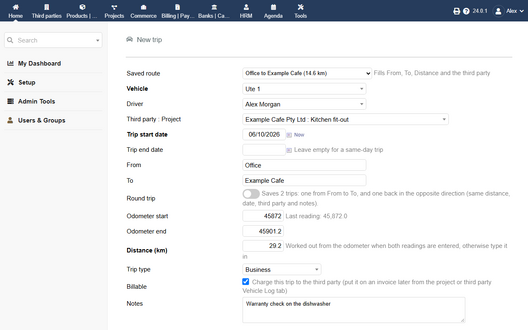
A new trip: saved route, odometer readings, third party : project, billable
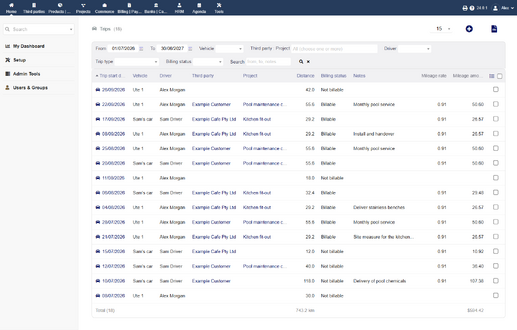
The trip list: mileage rate and amount per trip, totals
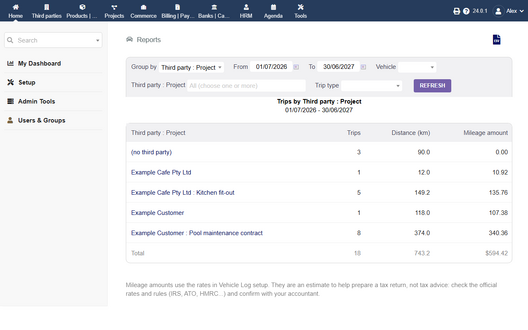
Report by third party : project for the tax year
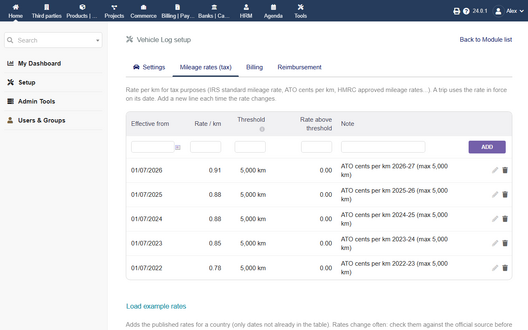
Tax mileage rates by date, with the 5,000 km threshold
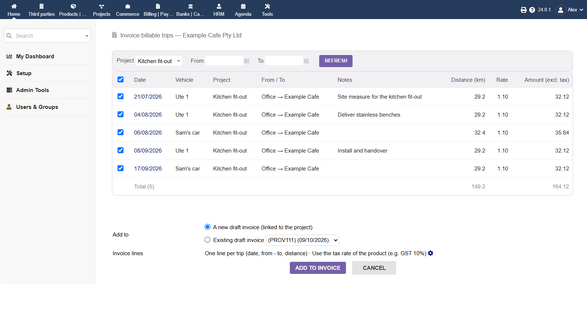
Billable trips of a project, ready to go on an invoice
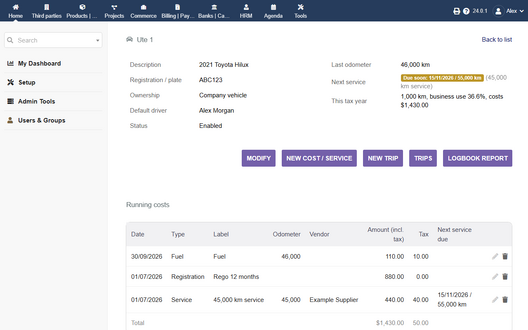
A vehicle: next service due, business use, running costs
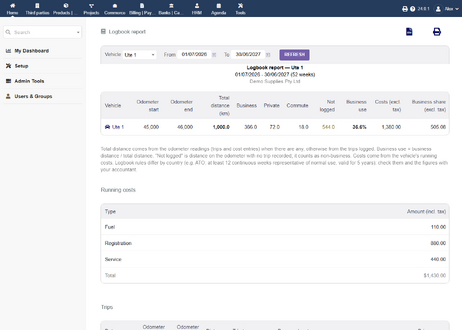
The logbook report: business use and business share of costs


