Module Two-Factor Authentication (2FA)

| Editor | Theo Pequignot (theopequignot.fr) |
|---|---|
| Module ID | 194155 |
| Version | 6.0.3 |
| Dolibarr | 16 to 24 |
| Where to get it | DoliStore |
| Support | contact@theopequignot.fr |
| Presentation and support | modules.theopequignot.fr |
One stolen, guessed or reused password is enough to get into your Dolibarr, and with it into your customers, invoices and bank accounts. This module adds a second factor to the login: even with the right password, nobody gets in without the user's phone, key or fingerprint.
Three methods, each user picks
- TOTP app: 6-digit code renewed every 30 seconds. Works with Google Authenticator, Microsoft Authenticator, Authy, 1Password, Bitwarden, Aegis, FreeOTP. The QR code is generated on your server, no third-party service.
- WebAuthn / FIDO2: security keys (YubiKey…) and built-in biometrics (Windows Hello, Touch ID, Face ID). One touch and you're in.
- Backup codes: 10 single-use codes, stored as bcrypt hashes, so a lost phone never locks anyone out.
Several devices per account
- A user can register a phone, a security key and a laptop, and name each one.
- Users add, rename or revoke their own devices from the Security tab of their user card.
Hardened by design
- TOTP secrets encrypted at rest (AES-256-CBC).
- Lockout after a configurable number of failures (5 by default).
- Anti-replay: an accepted code cannot be used twice.
- Audit log of every attempt: date, IP address, method, device, result.
- CSRF protection on every form and strict HTTP headers on the login pages.
For the administrator
- 2FA optional or mandatory for everyone, with one checkbox.
- Users are prompted to set up 2FA at their next login.
- Dashboard: adoption rate, last 24 h activity, blocked IP addresses.
- Overview of all users, reset of an account's 2FA, forced re-enrollment.
- Responsive login pages that stay readable whatever the Dolibarr theme.
Installation
Home → Setup → Modules → "Deploy/install external app/module", upload the zip and enable the module. Tables are created automatically.
Upgrading from a previous version: replace the files, then disable and re-enable the module (Setup → Modules). Settings, data and user permissions are kept.
Compatibility
- Dolibarr 16 to 24 (verified on 16, 18, 20, 22, 23 and 24).
- PHP 7.4 to 8.4, MySQL / MariaDB, OpenSSL extension.
- HTTPS required for WebAuthn / FIDO2 (a browser requirement).
- English and French included. Email support and updates for 2 years.
Screenshots
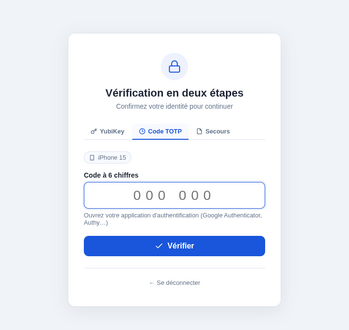
Verification screen after the password
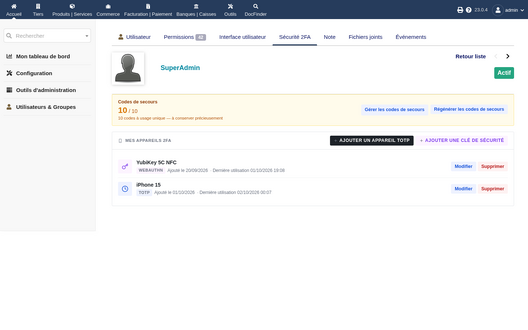
Devices and backup codes on the user card
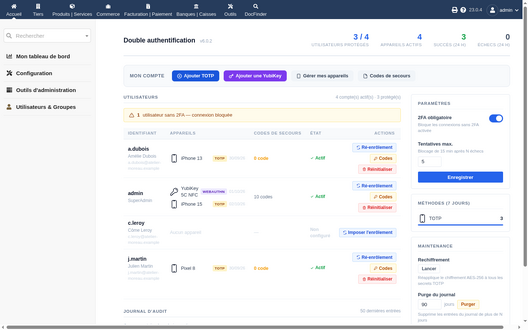
Administration: users, devices, mandatory 2FA


Versions
- 6.0.3 (3 October 2026): security fix, update recommended on Dolibarr 16 to 18. On these versions the second factor was not asked: the check relied on a Dolibarr hook that only exists from version 19. It now goes through a hook present in every version and called on every request. On every version, document downloads and exports also require the verification.
- 6.0.2 (2 October 2026): administration page fixed, interface translated into French and English.
Support
Questions before buying, installation or update issues: write to contact@theopequignot.fr. I am the developer of this module and I answer myself. Support and updates are included for 2 years with the DoliStore purchase. The full presentation of the module, its screenshots, frequently asked questions and the support form are on modules.theopequignot.fr. Purchases are made on the DoliStore.