Module Fountain Drinks + QR

Information
| Module name | Fountain Drinks + QR |
| Editor / Editeur | Cepuder Group Ltd - https://cepuder.com |
| Download or buy page / Page achat ou téléchargement | External module - www.dolistore.com |
| Status / Statut / Estado | Stable |
| Prerequisites / Prérequis | TakePOS, a Spire dispenser and a store licence
Dolibarr min version: See on Dolistore Dolibarr max version: See on Dolistore |
| Last update date / Date mise à jour fiche / Fecha última actualización | 2026-10-13 |
| Note / Nota | Free module, GPLv3. Tested on Dolibarr 24.0.1. |

Fountain Drinks + QR prints a QR code for every fountain drink sold through TakePOS, for use with Pepsi Spire controlled-pour dispensers. The customer scans the code at the dispenser, which pours that one drink in the size that was paid for.
Video
Watch QR controlled pour in action (49 seconds, at a movie theater in the Czech Republic): the customer pays, scans the code at the Spire and pours.
What it solves
Self-serve fountain drinks lose money when customers buy a small cup and fill a large one, or pour a sugared drink after paying for a zero-sugar one (which matters where sugar taxes apply). With this module, each paid drink gets its own code, and the Spire only pours what the code allows: the size, and depending on the licence, sugared drinks and flavor shots.
How it works
- When a TakePOS sale is paid, the module issues one code per fountain drink unit (two Medium drinks on one line give two codes).
- The Spire checks each code itself with the store's licence key. It needs no network, no cloud service and no connection to the till.
- Codes are issued once per invoice, so a reprinted receipt shows the same codes. Credit notes get no codes.
- If a paid sale is missing a code (no licence, or a size the licence doesn't allow), the TakePOS screen says so in red.
- Each code's ID and issue time are kept with the invoice. The Spire logs the same ID on every pour, so its log can be matched to the till and the sale.
Screenshots
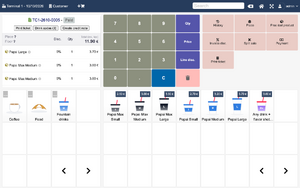
A paid TakePOS sale with the Drink codes button
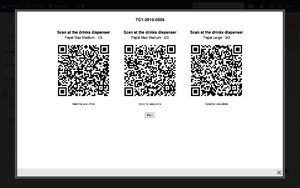
The codes full size on screen
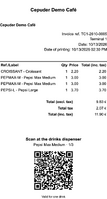
Browser-printed receipt with a code per drink
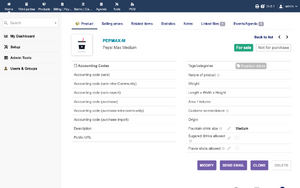
Fountain drink settings on a product


Printing
- Browser printing: the codes go in the TakePOS receipt footer, one page per drink. The module adds the placeholder
__SPIRE_QRCODES__to the footer when it is enabled and removes it when it is disabled. - ESC/POS printers (Receipt Printer module or TakePOS Connector): each drink gets a native QR code on its own cut slip after the receipt.
- On screen: a Drink codes button next to Print ticket shows the codes full size, to scan from the screen or reprint.
Setup
- Enable the module in Home > Setup > Modules (search for Fountain). It needs TakePOS, Invoices and Products.
- On the module setup page, upload the
config.license.jsonyou received from your PepsiCo bottler or from Cepuder. The page shows the licence tier, the sizes it allows and its Secret ID, which must match the one on the Spire. - On each fountain drink product, set Fountain drink size (Small, Medium or Large). Optionally tick Sugared drinks allowed and Flavor shots allowed. Products without a size are not drinks and get no code.
- Sell as usual.
Languages
English, French and Czech.
Licences, dispensers and support
The codes only work on Spire dispensers set up with the same store licence. Licences and dispensers come from your PepsiCo bottler or from Cepuder: https://cepuder.com, info@cepuder.com.
Pepsi and Spire are trademarks of their respective owners. This module is made by Cepuder Group Ltd and is not an official PepsiCo product.