Module CapTODO


Information
| Module name | CapTODO |
| Editor / Editeur | CAP-REL - www.cap-rel.fr |
| Download or buy page / Page achat ou téléchargement | External module - www.dolistore.com |
| Status / Statut / Estado | Stable |
| Prerequisites / Prérequis | Projects, Third parties, Tags/Categories and Agenda modules; SmartAuth module for the mobile app
Dolibarr min version: See on Dolistore Dolibarr max version: See on Dolistore |
| Last update date / Date mise à jour fiche / Fecha última actualización | 2026-10-27 |
| Note / Nota | Simple to-do lists built on the Dolibarr projects and tasks, with a mobile app you install on phones and tablets. |
Features
Dolibarr projects and tasks are powerful, but heavy for "call this customer back" or "order the parts". CapTODO turns them into to-do lists: a project category marks the lists, and each task takes one line, from Dolibarr or from your phone.
At a glance
- Who it is for: teams that track their actions in Dolibarr, technicians and sales people on the road, managers who want to see where the team stands.
- What the module does: it uses the native Dolibarr projects and tasks; a CapTODO task is a real Dolibarr task, visible in the Projects module, with its time spent and its documents.
- What it does not do: it keeps no separate task database and sends none of your data to an outside service. The mobile app talks to your own Dolibarr.
Feature list
- To-do lists - the projects of a configurable category become lists; sorted on five priority levels, changed with arrows or drag and drop.
- Tasks - due date, priority, linked third party, assignment, subtasks, activity history and recurrence (daily, weekly, monthly, yearly).
- Attached documents - quotes, plans or site photos on a list or a task, from Dolibarr or by taking a photo with the phone.
- Tags - colored categories on tasks and lists, created on the fly.
- Quick entry - one line is enough:
#tag,!priorityand@taskare recognized, voice dictation included. - Dashboard - your tasks of the day, of the week and overdue; a manager view shows the whole team.
- Time log - write down what you do during the day, then link the entries to tasks; usable offline.
- Agenda - tasks synchronized with the Dolibarr agenda, one colored event type per priority level.
- Internal messages - messages linked to a task or a list, sent to a user or a group, with a reply thread.
- Mobile app - installable web app (PWA) on Android and iOS, with a layout made for tablets.
- Seven languages - French, English, German, Spanish, Italian, Dutch and Portuguese (Brazil).
Screenshots
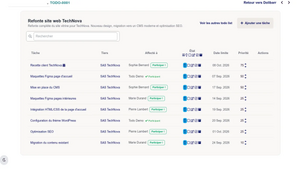
A to-do list in Dolibarr
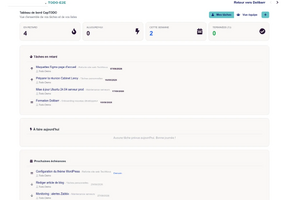
Dashboard: the tasks of the user
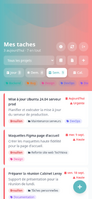
Tasks with their colored tags
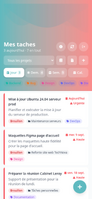
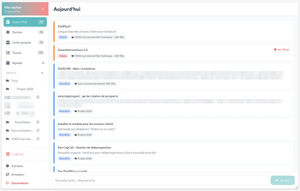
Mobile app: home page
Mobile app on a tablet
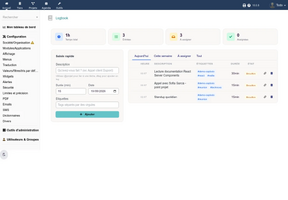
Time log


Links
- Module documentation (in French)
- What's new in version 2.0.8 (in French)
- Get notified of updates
- Support form
- Automated test report
- Online demo: a Dolibarr with a full data set, created for you in less than 20 seconds and deleted after the session
Requirements
| Item | Version or condition |
|---|---|
| Dolibarr | 18.0 or later |
| PHP | 7.4 or later |
| Dolibarr modules | Projects, Third parties, Tags/Categories and Agenda, enabled |
| Mobile app | SmartAuth module by CAP-REL, installed and enabled; the CapTODO pages in Dolibarr work without it |
| Rights | an administrator account to install, enable and set up the module |
Installation
- Download archive file of module (.zip file) from web site www.dolistore.com or from any other source.
- Install module into the /custom folder of Dolibarr:
- Go to Home - Setup - Modules - Deploy/install external app/module
- Upload the file. Note: If it fails because upload from this page has been locked by your web hosting provider, you can manually unzip the file into the /custom directory from command line: Go into the /custom directory and uncompress file with command unzip modulefile.zip then check that the directory with the nameof the module is inside the /custom directory. If into a subdirectory, just move it into /custom.
- Module should be ready to be activated and used.
Upgrade
- Install the new version through Home > Setup > Modules/Applications > Deploy/install external app/module.
- Disable then enable the module again: enabling applies the database updates, creates the new agenda event types and reloads the routes of the mobile app.
- On phones and tablets, open the mobile app again so it loads its new version.
Your lists, tasks, settings and time log entries are kept.
Uninstall
Disable the module from Home > Setup > Modules/Applications. Lists and tasks stay ordinary Dolibarr projects and tasks: you still find them in the Projects module.
Setup
To use this module, you must first enable it using an administrator account, via the menu option "Home - Setup - Modules".
Choose the tab where the module is listed. Then click on "Activate".
The module is now activated.
If a cog icon appears  on module thumb or at end of the line of the module, click on it to access the setup page specific to the module.
The setup page is Home > Setup > Modules > CapTODO, tab Settings.
| Setting | Purpose |
|---|---|
| Project category for to-do lists | the project category that marks the to-do lists; required for the module to work |
| Default references | numbering prefixes of lists and tasks, for example TODO-
|
| Interface | keep the Dolibarr menus on the CapTODO pages or show a full screen interface; rich editor for descriptions |
| Quick actions | four buttons per task: send an email, an internal message or add an appointment |
| Agenda synchronization | automatic creation and update of events, event type by priority |
| Logbook | time log activation, default duration, purge of linked entries, dictation trigger words |
Permissions
| Permission | Purpose |
|---|---|
| Read TODO lists, tasks, messages and the time log | access to the module pages and to the mobile app |
| Create and update TODO lists, tasks, messages and the time log | entry and update |
| Delete TODO lists, tasks, messages and time log entries | deletion |
| Manager view | see all team tasks on the dashboard |
The rights of the Projects module apply on top: a user sees the tasks of a private project only as a contact of that project or with the right to read all projects.
Usage
Once enabled, a TodoList entry appears in the left menu of Projects, with its Messages sub-entry and, when enabled, Logbook for the time log. A CapTODO tab is also added to the third party card, with the tasks linked to that third party.
For the mobile app, open its address on the phone and add it to the home screen; you sign in with your Dolibarr account.
Every screen is described in the user guide (in French).
FAQ
The module is enabled but no to-do list shows up.
Pick the project category of the lists in the module setup, then give that category to the projects concerned.
No agenda event is created for my tasks.
Enable the agenda synchronization in the setup, and tick the synchronization on the task when the automatic synchronization is off.
Do the "Day" and "Week" views follow my time zone?
No: due dates are dates without time, counted in days of the Dolibarr server.
All questions: FAQ of the documentation (in French).
Development
Developments and improvements can be proposed to the project leader by email (see the headers of the source files) or through the support form.