Module Auto PMP

| Module name | AutoPMP |
| Editor / Editeur | Weglob - https://weglob.com |
| Download or buy page / Page achat ou téléchargement | External module - https://www.dolistore.com/product.php?id=2569 |
| Status / Statut / Estado | Stable |
| Prerequisites / Prérequis | Products module enabled (Margins module recommended to see the margins)
Dolibarr min version: See on Dolistore Dolibarr max version: See on Dolistore |
| Last update date / Date mise à jour fiche / Fecha última actualización | 2026-11-12 |
| Note / Nota | Module ID 500000 |
Module Auto PMP (AutoPMP)
| Name | Value |
|---|---|
| Publisher | Weglob |
| Status | Stable |
| Version | 2.1.0 |
| Module ID | 500000 |
| Dolibarr compatibility | 19.0 to 24.0 |
| License | GPL v3 or later |
| Languages | English, French |
Description
Auto PMP adds an "Update cost prices" button on draft proposals, sales orders and customer invoices.
One click copies the weighted average price (PMP) of each product into the cost price of its line, then Dolibarr recalculates the margins. No more typing cost prices line by line, and your margins match the real stock value.
The PMP itself is computed by Dolibarr when supplier goods enter the stock. Auto PMP only reuses it.
Features
- Button next to Validate, Clone and Delete on draft documents.
- Native Dolibarr confirmation popup.
- Two update modes:
- All lines: every product line gets the current PMP, even if it already has a cost price.
- Only lines with cost price = 0: lines you priced manually are kept.
- Free text lines and products without a PMP are skipped.
- Totals and margins are recalculated right after the update.
- The button is shown only to users allowed to edit the document.
- Safe: the update runs once, then the page reloads (a refresh does not run it again).
Screenshots
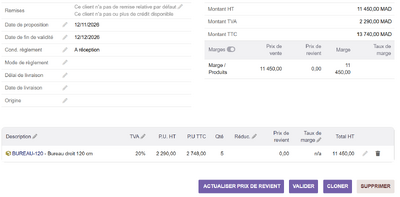
Draft proposal: cost price at 0, margin unknown
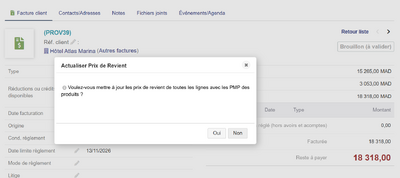
Confirmation popup
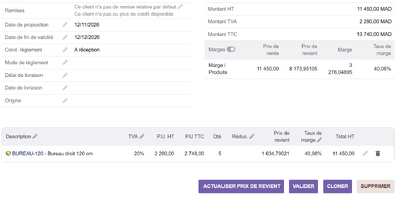
After the update: cost price = PMP, margin recalculated
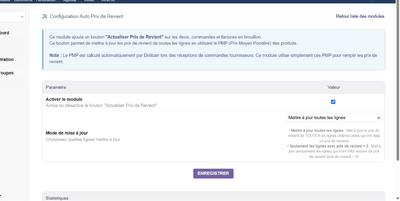
Setup page


Installation
- Buy and download the module zip from DoliStore.
- Go to Home > Setup > Modules/Applications > Deploy/install external module and upload the zip.
- Or unzip it manually into htdocs/custom/ so you get htdocs/custom/autopmp.
- Enable the Auto PMP module.
Configuration
- Open Setup > Modules/Applications > Auto PMP > Setup.
- Tick Enable the module.
- Choose the update mode: all lines, or only lines with a cost price of 0.
- Save.
Usage
- Open a draft proposal, order or invoice.
- Click Update cost prices at the bottom of the page.
- Confirm: a message tells how many lines were updated, and the margins are refreshed.
FAQ
- The button does not appear
- The document must be a draft, the module must be enabled in its setup page, and you need the right to create/modify this type of document.
- A line was not updated
- Free text lines and products whose PMP is 0 are skipped. In "only lines with cost price = 0" mode, lines that already have a cost price are kept.
- Where does the PMP come from?
- Dolibarr computes it on supplier stock entries. To include transport or customs fees in the PMP, see Module Charges PMP.
Support
- Email: contact@weglob.com
- Website: weglob.com
- LinkedIn: Mohamed Aggoubi