Module WhatsApp IA

| Module name | WhatsAppIA |
| Editor / Editeur | Weglob - https://weglob.com |
| Download or buy page / Page achat ou téléchargement | External module - https://www.dolistore.com |
| Status / Statut / Estado | Stable |
| Prerequisites / Prérequis | Dolibarr 19.0+, PHP 7.4+, a Meta WhatsApp Business Cloud API number, HTTPS
Dolibarr min version: See on Dolistore Dolibarr max version: See on Dolistore |
| Last update date / Date mise à jour fiche / Fecha última actualización | 2026-11-12 |
| Note / Nota | Module ID 517300 |
Module WhatsApp IA
| Name | Value |
|---|---|
| Publisher | Weglob |
| Status | Stable |
| Version | 1.0.0 |
| Module ID | 517300 |
| Dolibarr compatibility | 19.0 and later |
| License | GPL v3 or later |
| Languages | English, French |
Description
WhatsApp IA connects Dolibarr to the official Meta WhatsApp Business Cloud API. Your team handles WhatsApp conversations directly inside Dolibarr, and an optional AI agent answers customers using your real ERP data (invoices, orders, products, stock).
Messages are linked to third parties, so every exchange stays in the history of the customer or supplier.
Features
- Shared inbox in Dolibarr: list of conversations, unread counters, reply from the browser.
- Automatic link to third parties from the phone number.
- Send documents: send an invoice, proposal or order PDF in the chat from the Dolibarr card.
- AI agent (optional): answers questions such as "what is my balance?", "where is my order?", using read-only tools on Dolibarr data.
- Handoff to a human: when the AI is not sure, it hands the conversation over and creates a task for the team.
- Supplier invoices by WhatsApp: a supplier or employee sends a photo or PDF, the module creates a draft supplier invoice.
- AI log: question, tools used, answer, outcome and estimated cost for each AI run.
- WhatsApp usernames supported (contacts without a visible phone number).
- Multi-company compatible (one WhatsApp number per entity).
Screenshots
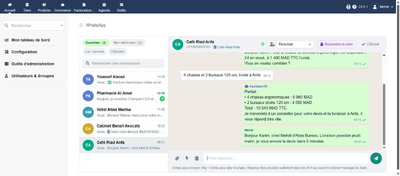
Inbox with the AI agent
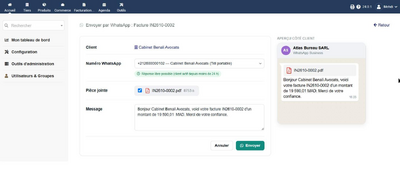
Send an invoice PDF in the chat
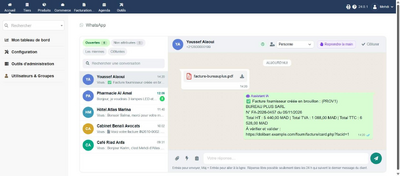
Supplier invoice received by WhatsApp
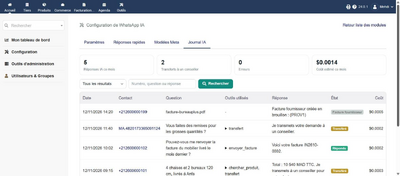
AI log


Prerequisites
- Dolibarr 19.0 or later, PHP 7.4 or later.
- Dolibarr reachable over HTTPS (required by Meta for the webhook).
- A Meta Business account with a WhatsApp Business number on the Cloud API.
- For the AI agent: an API key from a supported AI provider.
Installation
- Buy and download the zip module_whatsappia-x.y.z.zip from DoliStore.
- Go to Home > Setup > Modules/Applications > Deploy/install external module and upload the zip.
- Or unzip it manually into htdocs/custom/ so you get htdocs/custom/whatsappia.
Configuration
- Go to Home > Setup > Modules/Applications and enable WhatsApp IA.
- Open the module setup page.
- In Meta Business Suite, create a system user with full control on the WhatsApp Business Account (WABA) and generate a permanent token.
- Paste the token, the Phone number ID and the WABA ID in the setup page.
- Copy the webhook URL and verify token shown in the setup page into your Meta app (field messages).
- Optional: enable the AI agent, choose the provider and paste your key.
- Give the rights Read WhatsApp conversations and Reply to WhatsApp conversations to the users concerned.
The scheduled job WhatsAppIAProcessQueue processes the AI queue. Make sure Dolibarr cron jobs are running.
Permissions
- Read WhatsApp conversations
- Reply to WhatsApp conversations
FAQ
- The webhook returns 404
- Check that the custom directory is declared in conf.php ($dolibarr_main_url_root_alt and $dolibarr_main_document_root_alt).
- Meta error #10 (permission)
- The system user needs full control on the WABA, not only a partial permission.
- Meta error #131047
- The 24 hour customer service window is closed. Only an approved template message can be sent.
- A contact appears as "MA.123..." instead of a phone number
- The customer uses a WhatsApp username. The module stores the WhatsApp user ID and shows the username when Meta provides it.
- Is my data sent to the AI provider?
- Only when the AI agent is enabled: the customer message and the data returned by the read-only tools needed to answer. You can leave the AI off and use the module as a simple shared inbox.
Support
- Email: contact@weglob.com
- Website: weglob.com
- LinkedIn: Mohamed Aggoubi