Module DoliDropkit (dropshipping between two Dolibarrs)
| Editor | ERPkit (erpkit.app) |
|---|---|
| Module ID | 193043 |
| Licence | GPL v3 or later |
| Dolibarr | 17 to 24 |
| Database | MySQL, MariaDB or PostgreSQL |
| PHP | 7.4 to 8.3 |
| Where to get it | DoliStore or erpkit.app (paid module, price on the store page) |
| Version | See the store page |
| Documentation | Setting up DoliDropkit |
| Support | support@erpkit.app |
DoliDropkit connects a supplier and a reseller that both run Dolibarr: the reseller gets the supplier's catalogue, prices and stock, and each shipment it validates places the order with the supplier. It is installed on both, and the two Dolibarrs talk to each other directly, with no server in between and no ERPkit account.
What goes where
| Data | Direction | When |
|---|---|---|
| Catalogue and prices | Supplier to reseller | Every hour by default (or every 2, 4 or 6 hours): the products that changed, and every product once a day |
| Stock | Supplier to reseller, into the reseller's warehouse for this supplier | At the same frequency |
| Orders | Reseller to supplier | In real time, when the reseller validates a shipment from that warehouse |
| Tracking numbers and carrier | Supplier to reseller, on the reseller's shipments | Every hour by default |
| Invoices and credit notes | Supplier to reseller | Listed at the reseller, created there in one click with the payments already made |
- Prices: the supplier sets the reseller's price, as a discount on its selling price or a markup on its cost price.
- Catalogue: products are matched by reference, and missing ones are created at the reseller (both on by default). Kits can be sent with their composition.
- Orders: the supplier's Dolibarr creates a validated order, with the end customer as delivery contact. A refused order leaves the reseller's shipment as a draft, with the reason.
- Health: a light per partner on the Dolibarr home page ("DoliDropkit partners" widget), and a journal of every run under Tools > DoliDropkit journal.
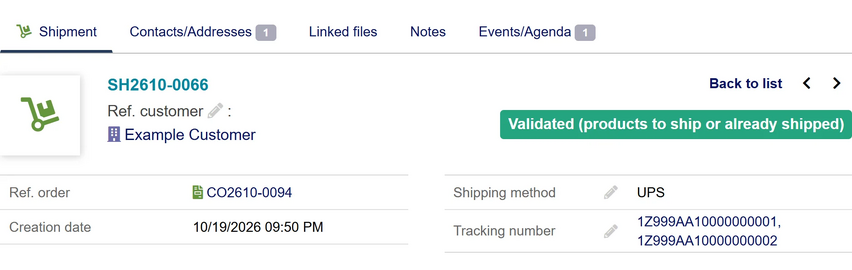
A reseller shipment with the carrier and the parcel numbers copied from the supplier (test data)
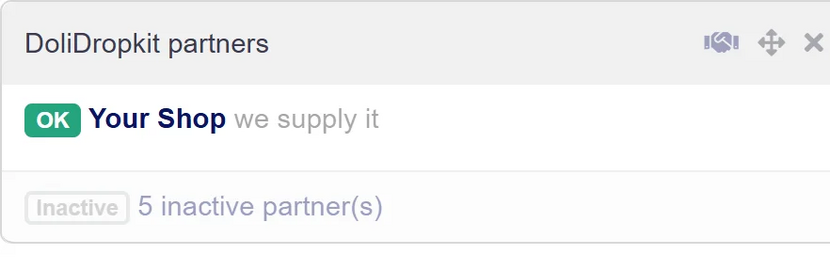
The "DoliDropkit partners" widget on the Dolibarr home page


How setup works

Each side sets up only its own Dolibarr:
- The supplier adds the reseller as a customer ("Add a customer"); the reseller adds the supplier as a supplier ("Add a supplier").
- In that record, "Create the API user" shows a pairing code, sent privately to the partner.
- The partner pastes it into "Pairing code from the partner" and clicks "Connect".
- Both sides tick "Active partner" and save: the scheduled jobs are created and the health light turns green.
The API user created for a partner has only the DoliDropkit permission: it reaches this partnership and nothing else, and opens nothing through Dolibarr's own API.
Prerequisites
- DoliDropkit and a Dolibarr admin on both sides.
- Dolibarr's scheduled jobs running on both sides: a cron that calls
scripts/cron/cron_run_jobs.phpevery few minutes. - Each Dolibarr reachable from the other over HTTPS, or plain HTTP on a private network.
Installation
- Get the module zip from DoliStore or erpkit.app.
- On each Dolibarr, go to Home > Setup > Modules/Applications, open the "Deploy/install external app/module" tab and upload the zip.
- Find DoliDropkit in the module list and switch it on. Dolibarr switches on the modules it needs with it.
- Click the gear icon next to DoliDropkit to open its setup page.
Limits
DoliDropkit does not:
- copy cancellations, or payments made after the invoice was created at the reseller;
- send alert emails;
- let the reseller choose which fields it accepts;
- map product extrafields;
- add a dropship fee;
- send product photos;
- use the supplier's price levels or per-customer prices for the reseller's price;
- order restocking for the reseller's own stock;
- print a white-label delivery note;
- import invoices automatically;
- show the reseller the order's status at the supplier.
It works in each Dolibarr's main company, not in the other companies of the Multicompany module.
Support
Email support@erpkit.app, with the journal line and both sides' DoliDropkit and Dolibarr versions (the record's Health row shows them). Documentation:
- Setting up DoliDropkit
- How DoliDropkit works, with what to do instead for each limit above
- DoliDropkit troubleshooting
- Licence, data and support
See also
- Module ERPkit: by the same editor, connects Dolibarr to online stores and marketplaces such as WooCommerce and Cdiscount, for prices, stock, orders and invoices.