Module Annual Reviews
Page en français : Module Entretiens annuels
| Module Annual Reviews | |
|---|---|
| Technical name | entretienannuel |
| Editor | Bakchich |
| Where to get it | DoliStore — link added after publication |
| Dolibarr versions | 19 to 24 (tested) |
| PHP | 8.1 to 8.5 |
| Languages | English, French |
| Licence | GPL v3 or later |
Module Annual Reviews
Annual Reviews runs your employee reviews inside Dolibarr, from the HR campaign to the signed PDF report: annual performance reviews, mid-year reviews, professional reviews (France) and probation reviews.
Features
- Campaigns: a wizard creates the campaign from a published template and a list of employees. The manager (N+1) is pre-filled from the Dolibarr hierarchy. HR checks the draft campaign (missing manager, disabled account, missing email…) before launching it.
- Customizable templates: four ready-to-use models, a tab-based editor, HR-imposed objectives and skills, free chapter and block titles, rating scales, weights, expectations matrix, template versions (draft / publish).
- Review workflow: manager preparation (objectives, meeting date and place) → employee self-assessment → interview → electronic signatures → automatic closing with PDF report.
- Scoring: weighted objectives, technical progression and soft-skill grids, manager appraisal, 1–5 rating through the expectations matrix.
- Notifications: editable email templates in English and French, daily reminders, weekly HR digest.
- France: alert when an employee's professional review is older than 2 years.
- Statistics, CSV export, review comparison, REST API.
Screenshots
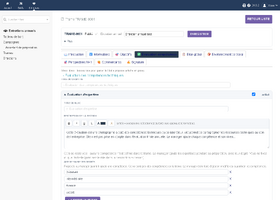
Template editor (competences tab)
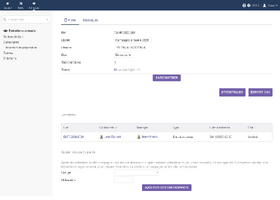
Campaign card
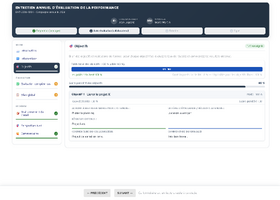
Employee self-assessment
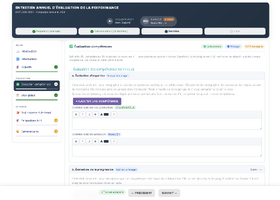
Skills assessment
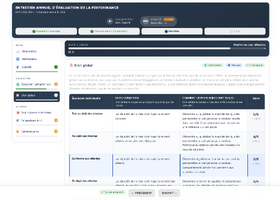
Overall rating and expectations matrix
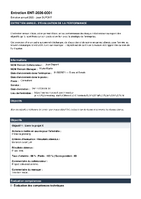
Signed PDF report
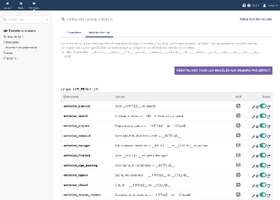
Email templates


Installation
- Download the module zip from DoliStore.
- Go to Home > Setup > Modules > Deploy/install an external module and upload the zip file (or unzip it into
htdocs/custom/). - Enable Annual reviews in Home > Setup > Modules. A Reviews entry appears in the top menu.
- Open the module setup: HR users, HR email addresses, HR copy of signed reviews, test mode.
- Grant the module permissions to your HR, manager and employee profiles.
- Enable the Scheduled jobs module so that reminders and the HR digest are sent.
- When your templates and first campaign are ready, tick Open to employees and managers in the module setup.
Quick start
- Reviews > Templates: Create from model, adapt the tabs, then Publish.
- Reviews > Campaigns > Wizard: choose the published template and the employees, check the draft campaign, then Launch. Each manager receives an email.
- The manager prepares each review (objectives, meeting date and place) and opens the self-assessment. The employee receives an email with the date and place.
- The employee fills in the self-assessment, the interview takes place, the manager then the employee sign. The review closes automatically and the PDF report is emailed to both, HR in copy.
Permissions
| Permission | Typical profile |
|---|---|
| Read own reviews | Employees |
| Conduct a review (evaluator) | Managers (N+1; N+2 get read-only access) |
| Manage campaigns and templates | HR |
| Read all reviews | HR, management |
| Administer module | Module administrator |
FAQ
- Managers and employees see "Access denied". Why?
- The module stays reserved to HR and administrators until you tick Open to employees and managers in the module setup. This lets HR prepare templates and campaigns quietly.
- No email is sent.
- Check the Dolibarr email setup (Home > Setup > Emails). Make sure Test mode is off in the module setup: in test mode, emails are only redirected or simulated. Reminders and the HR digest also need the Scheduled jobs module and the Dolibarr cron trigger.
- In which language are emails sent?
- In the language set on each recipient's Dolibarr user (French or English). Templates are editable for both languages in the module setup.
- Can I change the review content?
- Yes. Every template tab is editable: texts, objectives, skills, rating scales, weights, chapter and block titles, expectations matrix. The four built-in models are provided in French and are meant to be adapted.
- Where do I set the meeting place?
- On the manager's preparation tab: date, time, duration and a free-text place (meeting room, Teams / Google Meet / Zoom link, address). Links become clickable.
- What kind of electronic signature is it?
- A drawn signature (signature pad) by each party, stored with the review and printed on the PDF report. It is a simple electronic signature, not a qualified one.
- Can a signed review be modified?
- No. Once both parties have signed, the review is archived. HR can reopen it on request; previous signatures are then removed and both parties sign again.
- Can I add employees after launching a campaign?
- Yes, from the campaign card (Add participants). Their manager receives an email to prepare the review.
- What happens if I disable the module?
- Menus disappear but your data (templates, campaigns, reviews, signatures) is kept. Re-enabling the module brings everything back.
- Is any data sent outside Dolibarr?
- No. The module contacts no external service; everything stays in your Dolibarr database and documents directory.
- Which Dolibarr versions are supported?
- Dolibarr 19 to 24, tested on clean installations with the module deployed through Deploy an external module.
Support
See the DoliStore product page for the support contact.