Module CapFullPOS


Information
| Module name | CapFullPOS |
| Editor / Editeur | CAP-REL - cap-rel.fr |
| Download or buy page / Page achat ou téléchargement | External module - www.dolistore.com |
| Status / Statut / Estado | Stable |
| Prerequisites / Prérequis | SmartAuth module 2.0.34 or higher; Products, Services and Categories modules
Dolibarr min version: See on Dolistore Dolibarr max version: See on Dolistore |
| Last update date / Date mise à jour fiche / Fecha última actualización | 2026-10-28 |
| Note / Nota | Touch-friendly, offline-capable point of sale built into Dolibarr: order then invoice flow, mixed payments, restaurant mode, ticket printing and customer display. |
Features
CapFullPOS turns Dolibarr into a touch point of sale. Your products, customers and invoices stay in your ERP, with no external synchronization. The till is a web application (PWA) that runs on a tablet, a PC or a smartphone, and keeps selling when the network goes down. It is an alternative to the built-in TakePOS module.
At a glance
- Who it is for: shops, stores, bars, restaurants, food trucks and event points of sale that sell over the counter or in a dining room and want a till connected to Dolibarr.
- What it does: items go first into an editable order; the Dolibarr invoice and its payments are created at checkout. Until the payment is validated, lines can be added, changed or cancelled.
- What it does not do: it does not drive the card terminal (the cashier records the card payment the terminal accepted), and restaurant mode is optional: a retail business only sets up its tills and payment methods.
Feature list
- Touch sales interface - catalog by categories, search by barcode, reference or label, barcode scan with the device camera, variants, weighed products, free price.
- Cart - per-item notes (cooking, sauce, allergy), billed supplements, line discounts, free (offered) lines with a reason, automatic grouping of identical lines.
- Checkout - cash with change calculation, card, cheque (number and bank), bank transfer, meal vouchers with per-voucher and daily caps, mixed payment, deferred payment.
- Discounts and credits - global discount with a reason and a configurable cap, customer credit notes applied at checkout, paid gift cards (QR code and text code).
- Bill splitting - equal shares, by item, offered share, tips kept out of the invoice, business expense note.
- Returns - sales history with cancellation, payment reversal and credit note, each under its own permission.
- Orders on hold - put an order aside and resume it later to free the till.
- Restaurant mode - floor plan with zones and tables, covers, staged kitchen dispatch, preparation tracking, waiting-time alerts.
- Table QR codes - printable QR cards per table: the customer reads the menu and, if the till allows it, orders from the phone; the order waits for the waiter's validation.
- Printing - sales tickets and kitchen tickets on ESC/POS printers (USB or network) or through the browser, customizable ticket template.
- Customer display - second screen paired with a 6-digit code, with your colors, font, logo and an idle slideshow.
- Several tills - each till has its own default customer, root category, printers and restaurant options; each device is enrolled on one till and numbers its own tickets, offline included.
- Offline mode - the catalog is kept on the device, sales wait locally and are sent as soon as the network is back.
- Seven languages - English, French, German, Spanish, Italian, Dutch and Brazilian Portuguese, for the module and the till.
Screenshots
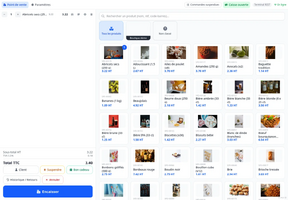
Sales interface: cart on the left, catalog on the right
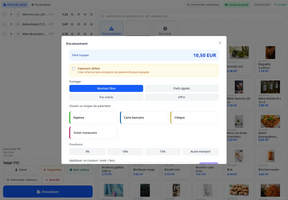
Checkout screen with the payment methods and the amount due
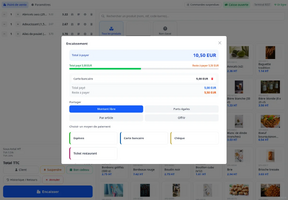
Bill splitting: free amount, equal shares, by item, offered
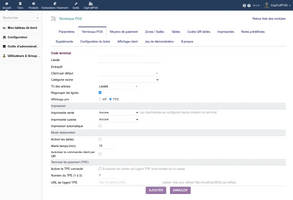
Creating a till in the module setup
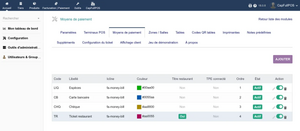
Payment methods of the tills
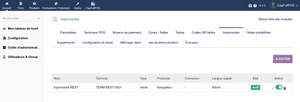
Ticket and kitchen printers
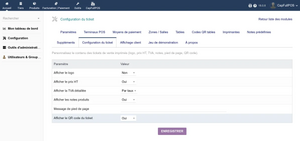
Ticket template settings
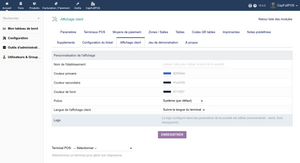
Customer display theme


Links
- Module documentation
- What's new in version 1.4.0 (in French)
- Get update notifications
- Support form
- Automated test report
- Online demo: a Dolibarr with a demonstration till already set up, created for you in less than 20 seconds and removed after the session
Requirements
| Item | Version or condition |
|---|---|
| Dolibarr | 18.0 or higher |
| PHP | 7.4 or higher |
| SmartAuth module (CAP-REL) | 2.0.34 or higher, installed and enabled before CapFullPOS |
| Web server | a dedicated HTTPS virtual host for the till application, Apache with mod_rewrite |
| Till device | a recent web browser (tablet, PC or smartphone) |
| Rights | an administrator account to install, enable and set up the module |
The till application signs in to Dolibarr through the SmartAuth module: without it, or with an older version, enabling CapFullPOS is refused with a message giving the expected version.
Enabling CapFullPOS also requires these Dolibarr modules:
| Dolibarr module | Use |
|---|---|
| Products and Services | the catalog sold at the till |
| Categories | the catalog navigation and the root category of each till |
Each sale produces a standard Dolibarr customer invoice with its payments: the cashier also needs the Dolibarr rights to read products, categories and third parties, and to create invoices.
Installation
- Download archive file of module (.zip file) from web site www.dolistore.com or from any other source.
- Install module into the /custom folder of Dolibarr:
- Go to Home - Setup - Modules - Deploy/install external app/module
- Upload the file. Note: If it fails because upload from this page has been locked by your web hosting provider, you can manually unzip the file into the /custom directory from command line: Go into the /custom directory and uncompress file with command unzip modulefile.zip then check that the directory with the nameof the module is inside the /custom directory. If into a subdirectory, just move it into /custom.
- Module should be ready to be activated and used.
Till application
The sales interface is a web application shipped in the pwa/ folder of the module. Serve it from the root of a dedicated HTTPS virtual host (camera scan and install on the home screen require HTTPS), with AllowOverride All so that the provided .htaccess applies. The application calls its API at the same address: there is nothing else to configure. The installation guide gives a complete Apache example.
Upgrade
- If the new version requires a newer SmartAuth, upgrade SmartAuth first.
- Install the new version through Home > Setup > Modules/Applications > Deploy/install external app/module.
- Disable then enable the module again: enabling applies the database upgrades and registers the new permissions.
Recorded sales and settings are kept.
Uninstall
Disable the module from Home > Setup > Modules/Applications. Tills, settings and sales stay in the database, and the invoices remain standard Dolibarr invoices.
Setup
To use this module, you must first enable it using an administrator account, via the menu option "Home - Setup - Modules".
Choose the tab where the module is listed. Then click on "Activate".
The module is now activated.
If a cog icon appears  on module thumb or at end of the line of the module, click on it to access the setup page specific to the module.
The setup is in the CapFullPOS menu of the top bar, or in Home > Setup > Modules > CapFullPOS. It has thirteen tabs: Parameters, POS Terminals, Payment Methods, Zones / Areas, Tables, Table QR codes, Printers, Note presets, Supplements, Ticket configuration, Customer display, Demo dataset and About.
Parameters
| Setting | Purpose | Default |
|---|---|---|
| Default customer for POS sales | customer invoiced when the sale has no customer and the till has no default customer | empty |
| Bank account for payments | with the Banks module, account the payments of payment methods without an account of their own are recorded on; while it is empty, the parameters page shows a warning | empty |
| Stock deduction mode | No deduction, On order (when the order is validated) or On invoice (when the invoice is validated); the stock leaves the till warehouse | No deduction |
| Catalog root category | when set, the till only sees this product category and its subcategories; a till may narrow it further, never beyond | empty (full catalog) |
| Per-voucher meal-voucher cap | amount above which a single meal voucher asks the cashier for a confirmation | 19.10 EUR |
| Daily meal voucher cap | amount per guest and per day above which the till shows a warning, without blocking the payment | 25.00 EUR |
| Gift-card payment type code | payment type used to record a gift card redemption when the till sends no explicit method | LIQ |
| Maximum global discount | highest global discount the cashier may grant, in percent of the total; also caps fixed-amount discounts | 100 (no cap) |
| Unit price decimals / Totals decimals | precision of the till, when it must differ from the Dolibarr setting | empty (Dolibarr setting) |
| Disable till enrolment (demo mode) | Yes gives every device the first active till with no enrolment; keep No in production | No |
Tills
The POS Terminals tab creates the tills. Each till has its code, label, warehouse, default customer, root category, product sort order, line grouping, price display (excluding or including tax), sales and kitchen printers, automatic printing and its restaurant options (tables, waiting-time alert of 15 minutes by default, customer ordering by QR code).
A sale with no customer selected is invoiced to the default customer of the till, else to the default customer of the Parameters; without either, the invoice cannot be created.
The till warehouse is where the sold products leave from when the Stock deduction mode is not No deduction and the Stocks module is enabled. A till without a warehouse sells with no stock movement. When the Dolibarr option that decreases stock on invoice validation is on, CapFullPOS lets it decrease the stock in On invoice mode, once; in On order mode, the invoice decreases nothing more. A short stock refuses the sale, unless Dolibarr allows negative stock. Products managed by lot are only decreased by the Dolibarr option that decreases stock on invoice validation.
Device enrolment
Each device must claim a till before selling, which guarantees one device per till and ticket numbers that never collide. In the POS Terminals tab, Generate enrolment code gives a 6-digit code valid for 5 minutes, to type on the device. Release till frees a till held by a device.
Other tabs
- Payment Methods: code, label, icon, color, order and category (cash, card, cheque, transfer, paper or card meal voucher, gift voucher, credit note, loyalty), which decides the behavior at checkout, and bank account of its payments (Banks module); without an account of its own, the bank account for payments of the Parameters is used.
- Zones / Areas, Tables and Table QR codes: the floor plan of restaurant mode and the printable QR cards.
- Printers: sales or kitchen printer, USB, network (port 9100 to 9109) or browser, 58 or 80 mm paper.
- Note presets and Supplements: note buttons for the kitchen and billed options, global or limited to a product category.
- Ticket configuration: logo, prices excluding tax, VAT detail, product notes, footer and QR code of the digital receipt.
- Customer display: name, colors, font, logo and language of the second screen, and the slideshow of each till.
Scheduled task
The module registers one scheduled task, Purge idempotency records, enabled at installation and run daily: it removes the payment safety records older than 30 days. It is listed in Home > Admin tools > Scheduled jobs.
Demo dataset
The Demo dataset tab, reserved for Dolibarr administrators, generates then purges a full catalog with tills and customers. Generation is refused on a production instance: it is meant for demonstrations, training and testing.
Permissions
CapFullPOS adds fourteen permissions, granted from Home > Users & Groups, Permissions tab. Grant them through groups (cashier, till manager, administrator).
| Permission | What it allows |
|---|---|
| Use the POS interface | open the till; without it the application refuses every request |
| CapFullPOS administration | the setup tabs of the module (the Demo dataset tab needs a Dolibarr administrator) |
| Read terminals / Create/Update terminals | see the tills, change a till from the application |
| Delete terminals | delete a till in the POS Terminals tab (which also needs CapFullPOS administration); without it, the delete icon is not shown |
| Read orders / Create/Update orders / Delete orders | see, create and change, delete the till orders |
| Apply discounts | line discount, global discount, customer credit notes at checkout |
| Cancel validated orders | cancel a sale already validated |
| Process refunds | reverse a payment and issue a credit note |
| Open cash drawer | open the drawer outside a sale |
| View POS reports | till reports and session totals, and replay of offline sales set aside in quarantine |
| Issue and sell gift cards | sell a gift card at the till |
Sensitive actions are hidden in the application when the permission is missing and refused by the server anyway. Rights are read at sign-in: a user signs out and in again to get a new right.
Usage
- Open the till application in the browser of the device and sign in with your Dolibarr login.
- On a new device, type the enrolment code of the till. The first time, the catalog and its pictures are copied to the device.
- Add items to the cart, pick a customer if needed, then Checkout: choose one or several payment methods and validate. The invoice and its payments are created in Dolibarr.
In restaurant mode, open a table from the floor plan, enter the covers, send the items to the kitchen course by course, then check out the table, with bill splitting if needed.
On a smartphone the layout adapts: navigation at the bottom and the cart in a panel.
Each screen is described in the user guide and the rights in the permissions guide.
FAQ
Enabling the module is refused.
Install and enable the SmartAuth module, version 2.0.34 or higher, then enable CapFullPOS again.
Why does the application ask for an enrolment code?
The device is not attached to a till yet. An administrator generates a 6-digit code in the POS Terminals tab; type it and validate with Claim till.
The sale cannot be invoiced.
Select a customer, or set a default customer on the till or in the Parameters. Also check that the cashier has the Dolibarr right to create invoices.
The catalog is empty or a warning shows at the top of the till.
The cashier lacks the Dolibarr rights to read products or categories, or the root category of the till holds no product.
Can I use CapFullPOS without restaurant mode?
Yes. Leave tables disabled on the till: the sales interface works without a floor plan.
What happens without network?
The till keeps selling: sales are stored on the device and sent to Dolibarr when the network is back; a badge shows how many are waiting.
All questions: documentation FAQ.
Development
Developments and improvements can be suggested to the project maintainer by email (see the headers of the source files) or through the support form.