Module OnePageBasket


Information
| Module name | OnePageBasket |
| Editor / Editeur | CAP-REL - www.cap-rel.fr |
| Download or buy page / Page achat ou téléchargement | External module - www.dolistore.com |
| Status / Statut / Estado | Stable |
| Prerequisites / Prérequis | Agenda, Invoices, Services, Banks, Categories and Contracts modules (enabled with OnePageBasket)
Dolibarr min version: See on Dolistore Dolibarr max version: See on Dolistore |
| Last update date / Date mise à jour fiche / Fecha última actualización | 2026-10-23 |
| Note / Nota | Online shop and customer portal plugged into the Dolibarr catalogue: an order placed online arrives in Dolibarr as a real order, then as a paid invoice. |
Features
OnePageBasket turns Dolibarr into an online shop and a customer portal, with no double entry. Your products, services, prices and pictures become a storefront your customers browse on a computer or a phone. An order placed online arrives in Dolibarr as a real order, then as a paid invoice: no synchronisation to watch over, no second tool to keep up to date next to your ERP.
At a glance
- Who it is for: shops and service providers who already run their business in Dolibarr and want to sell online without setting up a separate platform.
- What it does: it publishes your Dolibarr catalogue as a shop, takes the order and the payment, creates the third party, the order and the invoice in Dolibarr, and gives your customers a portal with their documents.
- What it does not do: it does not try to replace Prestashop or WooCommerce; it offers a simple shop, built into Dolibarr.
Feature list
- Storefront - catalogue by categories, search, product pages with pictures and variants, product badges, customer reviews, carousel, trust badges, multilingual web pages, FAQ, newsletter, customer picture gallery, Open Graph tags, canonical URLs and sitemap.
- From basket to payment - a single order form, third party created when it does not exist yet (looked up by email or VAT number), order or quote created in Dolibarr with every basket line, online payment through the Dolibarr payment modules, paid invoice sent to the customer, discount codes and rules, saved basket and reminders for abandoned baskets.
- Physical products and services - shipping costs from the basket weight and the delivery zone, in-store pickup, stock shown and checked, subscriptions from recurring invoices and contract templates, prepaid time, leasing and appointment booking in the Dolibarr agenda.
- Legal and tax rules - European right of withdrawal (directive 2011/83/EU), intra-EU reverse charge, sales outside the European Union, VAT of the destination country for distance sales to EU consumers (OSS).
- Private catalogue and B2B sales - products visible only to some customer categories, the Dolibarr price level of the logged-in customer, one account for several companies.
- Customer portal - quotes, orders, invoices, contracts, interventions, projects and leases as PDF, login by one-time code or password, account details, favourites lists, product returns (RMA), support tickets.
- Administration - settings in themed tabs, a dedicated dashboard, a permission for a non-administrator shop manager, webhooks on purchase, data cache, multicompany.
- Themes and languages - several themes, mobile-friendly, with dark mode; shop and portal in English, French, German, Spanish, Italian, Dutch, Polish and Brazilian Portuguese.
Screenshots
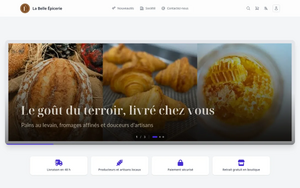
Shop home page
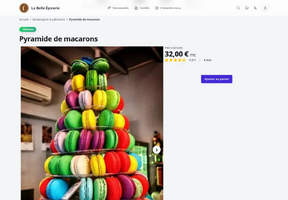
Product page
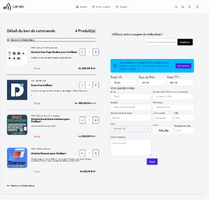
Basket
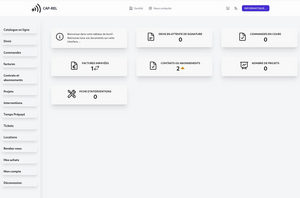
Customer portal
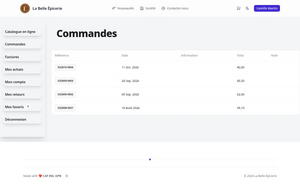
Orders of the customer in the portal
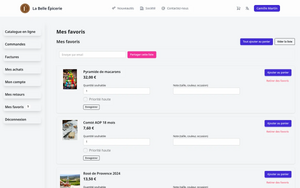
Favourites lists

The shop on a phone
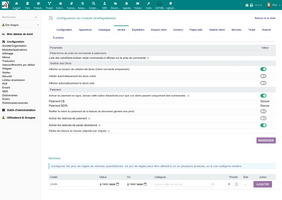
Setup tabs in Dolibarr


Links
- Module documentation
- What's new in version 1.5.1 (in French)
- Get update notifications
- Support form
- Online demo: a Dolibarr with OnePageBasket, created for you in less than 20 seconds and removed after the session
- A shop running OnePageBasket
Requirements
| Item | Version or condition |
|---|---|
| Dolibarr | 18.0 or higher |
| PHP | 7.4 or higher |
| Rights | an administrator account to install, enable and set up the module |
| Online payment | a Dolibarr payment module (card and SEPA direct debit through Stripe or Stancer) |
Enabling OnePageBasket also enables the Agenda, Invoices, Services, Banks, Categories and Contracts modules. Depending on the features used, enable Commercial proposals, Sales orders, Stock, Shipments and Tickets too.
Installation
- Download archive file of module (.zip file) from web site www.dolistore.com or from any other source.
- Install module into the /custom folder of Dolibarr:
- Go to Home - Setup - Modules - Deploy/install external app/module
- Upload the file. Note: If it fails because upload from this page has been locked by your web hosting provider, you can manually unzip the file into the /custom directory from command line: Go into the /custom directory and uncompress file with command unzip modulefile.zip then check that the directory with the nameof the module is inside the /custom directory. If into a subdirectory, just move it into /custom.
- Module should be ready to be activated and used.
Upgrade
- Install the new version through Home > Setup > Modules/Applications > Deploy/install external app/module.
- Disable then enable the module again: enabling applies the database upgrades and registers the new permissions.
Your settings, pages and customer accounts are kept.
Setup
To use this module, you must first enable it using an administrator account, via the menu option "Home - Setup - Modules".
Choose the tab where the module is listed. Then click on "Activate".
The module is now activated.
If a cog icon appears  on module thumb or at end of the line of the module, click on it to access the setup page specific to the module.
The setup is in Home > Setup > Modules > OnePageBasket. First set:
- Default user (mandatory): the Dolibarr user that creates the orders and invoices of the shop.
- Default country: used for VAT when the customer does not give a country.
- Public address: the address of your shop. A dedicated virtual host pointing to the
public/folder of the module is recommended. - Root category: only the products of this category and of its subcategories are shown.
The other settings are grouped in tabs: Settings, Appearance, Catalogue, Sales, Shipping, Customer portal, Returns, Content, Web pages, Gallery, Services, Tickets (when the Tickets module is enabled), Advanced and About.
Permissions
The module declares permissions for its customer portal login, its setup pages (a non-administrator can manage the shop), product returns, leasings and appointment availabilities. An administrator grants them from Home > Users & Groups, Permissions tab. After an upgrade, disable then enable the module so that new permissions are registered.
Usage
Prepare the catalogue in Dolibarr (products in the root category, prices, pictures, public notes), then share the address of the shop. Orders and quotes arrive in Dolibarr, linked to the third party of the customer; once paid online, the order becomes a paid invoice sent to the customer. The day-to-day use is described in the user guide.
FAQ
The shop shows no product.
Check the root category of the setup: only the products of this category and of its subcategories are shown, and only when they are on sale.
The setup warns that the configuration is incomplete.
Choose the default user in the Settings tab: the shop needs it to create orders and invoices.
Addresses of the shop contain index.php.
Enable the Apache mod_rewrite module, then the option that hides index.php in the web addresses.
Development
Developments and improvements can be suggested to the project maintainer by email (see the headers of the source files) or through the support form.