Module Login Guard

| Editor | Theo Pequignot (theopequignot.fr) |
|---|---|
| Module ID | 194152 |
| Version | 1.8.1 |
| Dolibarr | 16 to 24 |
| Where to get it | DoliStore |
| Support | contact@theopequignot.fr |
| Presentation and support | modules.theopequignot.fr |
Dolibarr's login page is exposed to the Internet and does not limit password attempts. Login Guard protects it and tells you as soon as something unusual happens on an account.
Progressive brute-force blocking
- After several wrong passwords, the IP address is paused: 5 minutes the first time, longer at each repeat, up to the ceiling you set.
- Allow-list of addresses and ranges (IPv4 and IPv6) with an "add my current IP" button: you never lock yourself out.
- Current blocks screen with manual unblocking.
Suspicious-login alerts
- Login from a new device or a new country: the user gets an email with the city, IP address, browser and a map of the area. Optional copy to an administrator.
- Each user's first login is learned silently: no false alarm on day one.
- Connection source: network operator and network type (fixed line, mobile, hosting/VPN), so you can tell at a glance whether the displayed city can be trusted.
Login map and journal
- Interactive world map: zoom, pan, click a point to see the accounts and IP addresses behind it.
- Journal of every attempt (date, account, IP, country, browser), filterable, sortable, CSV export, purged automatically after the retention you choose (GDPR).
- "Declared places": set the true position of an address range (office, site, VPN); it overrides public databases.
- Security dashboard.
Passwords and sessions
- Password policy: minimum length, character classes, no reuse of previous passwords. Optional expiry with advance notice by email.
- Active sessions: who is connected right now, one-click logout of any session, optional idle logout.
Nothing leaves your server
Geolocation uses a database installed locally in one click (free DB-IP Lite, or MaxMind GeoLite2 with your key). Email maps are drawn on your server. No API key, no subscription, no IP address sent to a third party.
Installation
Home → Setup → Modules → "Deploy/install external app/module", upload the zip and enable the module. Protection starts right away with safe defaults; the more intrusive features (password expiry, idle logout) ship disabled.
Upgrading from a previous version: replace the files, then disable and re-enable the module (Setup → Modules). Settings, data and user permissions are kept.
Compatibility
- Dolibarr 16 to 24 (verified on 16, 18, 20, 22, 23 and 24).
- PHP 7.4 to 8.3, MySQL / MariaDB and PostgreSQL. GD extension for maps in emails.
- Multi-company: each entity only sees its own activity.
- English and French included. Email support and updates for 2 years.
Screenshots
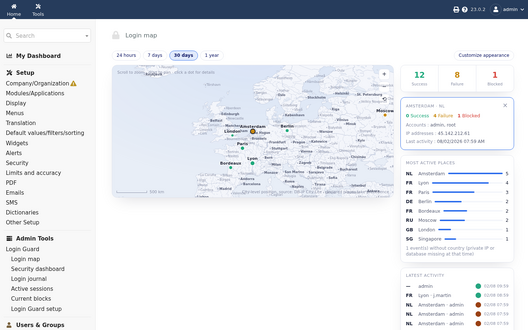
Interactive login map
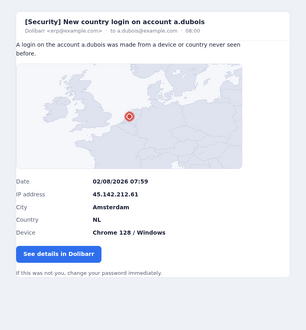
Alert email on a login from a new country
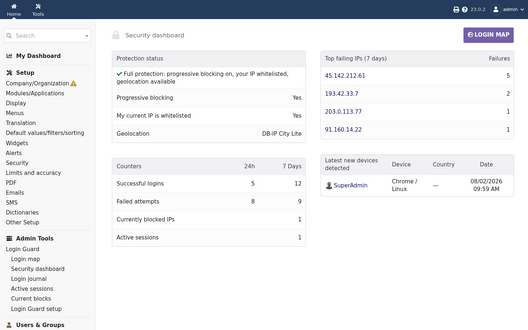
Security dashboard


Support
Questions before buying, installation or update issues: write to contact@theopequignot.fr. I am the developer of this module and I answer myself. Support and updates are included for 2 years with the DoliStore purchase. The full presentation of the module, its screenshots, frequently asked questions and the support form are on modules.theopequignot.fr. Purchases are made on the DoliStore.