Module Etabli

| Editor | Theo Pequignot (theopequignot.fr) |
|---|---|
| Module ID | 194160 |
| Version | 1.0.2 |
| Dolibarr | 16 to 24 |
| Where to get it | DoliStore (Établi) |
| Support | contact@theopequignot.fr |
| Presentation and support | modules.theopequignot.fr |
Établi is an interface theme for Dolibarr. It sits on top of the Eldy theme and redesigns the whole interface without touching the core: modules move to a column on the left, each section's menu becomes a tab bar at the top, cards and lists are laid out again. Disable the module and the original interface is back at once.
What the theme changes
- Module rail: Third parties, Commerce, Billing, Projects… in a column on the left, with icon and label. The open module stands out.
- Top bar: the section you are in, Dolibarr's global search and your account, always in the same place.
- Tabs instead of the left menu: the section's entries become tabs, and those with sub-entries (List, Draft, Unpaid…) open as drop-down menus. The full screen width goes back to the content.
- Readable cards: clean header, fields and amounts in panels, remaining amount to pay highlighted, an action bar that stays visible at the bottom of the screen. Main actions (validate, enter payment) are filled, delete sits apart on the left.
- Lists, forms, setup pages, calendar, confirmation dialogs and messages follow the same design.
- Login page in two columns: your company name and a welcome line on the left, the form on the right.
Settings
- Layout: Console (module rail on the left, tabs at the top) or Classic (original top menu, with the theme's styling).
- Accent colour: Prussian blue, fir green, wine, ochre, slate, or any colour. A colour too light for white text is darkened automatically to stay readable.
- Font: IBM Plex Sans, shipped with the module, or the system font.
- List density: airy or compact.
- Login page: themed or original, with a custom welcome line.
How it works
- No table created, no core file changed: the module loads one stylesheet (
css/etabli.css.php) and a small script (js/etabli.js) that moves the search box and turns the left menu into tabs. - Only the Eldy theme is restyled; with another theme the stylesheet is empty. Dolibarr dark mode: when forced, Établi does not apply; when following the system, it applies to the light interface only.
- Below 768 px wide, Eldy's mobile layout is kept, with the colours and the card styling.
- External modules with their own style keep it.
- Fonts are served by your own server: no call to any external service.
- Disable the module and the original interface comes back right away. Settings (
ETABLI_*constants) stay in the database for a later reactivation.
Installation
Home → Setup → Modules → "Deploy/install external app/module", upload the zip and enable Établi (Interface family). Settings are on the module page (gear icon).
Compatibility
- Dolibarr 16 to 24, verified on 16.0, 17.0, 18.0, 19.0, 20.0, 21.0, 22.0, 23.0 and 24.0.
- PHP 7.4 to 8.4. Eldy theme, light interface.
- English, French, Spanish, Italian and German included. Email support and updates for 2 years.
Screenshots
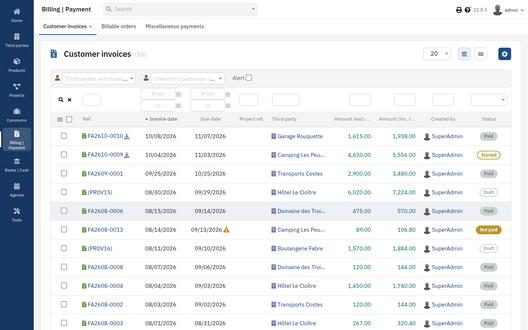
Customer invoices list, with the module rail and the tab bar
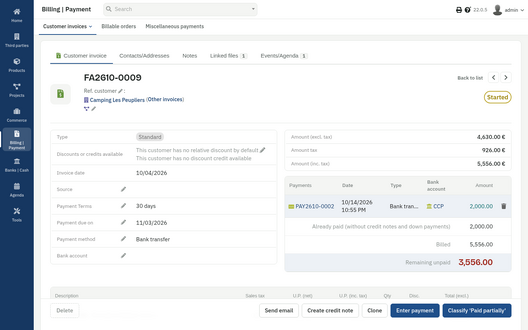
Invoice card: panels, remaining amount, sticky action bar
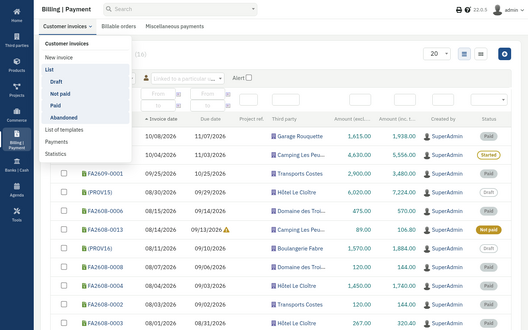
A tab opened as a drop-down menu
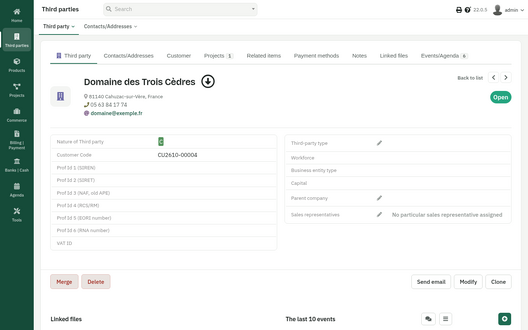
Third party card with the fir green accent colour
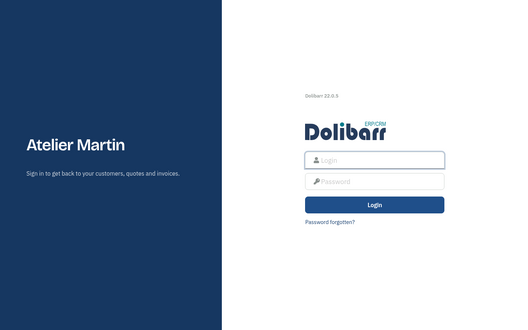
Login page
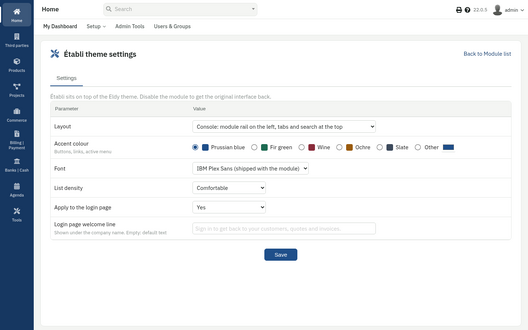
Settings page


Versions
- 1.0.2 (14 October 2026): on Dolibarr 24 lists, the multiple-choice "Status" filter was taller than the other filter fields; fixed.
- 1.0.1 (8 October 2026): dashboard box icons follow the box height, search keeps working when the Select2 library is missing, login button uses the theme font.
- 1.0.0 (8 October 2026): first version.
Support
Questions before buying, installation or update issues: write to contact@theopequignot.fr. I am the developer of this module and I answer myself. Support and updates are included for 2 years with the DoliStore purchase. The full presentation of the module, its screenshots and the support form are on modules.theopequignot.fr. Purchases are made on the DoliStore.