Module StampSignature
Jump to navigation
Jump to search

| Editor | Agadir Informatique (agadir-informatique.ma) |
|---|---|
| Module ID | 471522 |
| Version | 1.0.0 |
| Dolibarr | 16 to 24 |
| Where to get it | DoliStore |
| Support | contact@agadir-informatique.ma |
Prints your company stamp and signature on your PDF invoices, proposals and orders, always or only when you tick Signed and stamped on the document.
Features
Scan your signed stamp once, and Dolibarr prints it on the last page of your PDF documents.
- Three modes per document type: never, always, or on demand with a "Signed and stamped" box on the document card (still editable after validation; the PDF is regenerated automatically when the box is ticked or unticked).
- Real ink-stamp rendering: the white background of the scan disappears and the text underneath stays readable, even without the GD extension.
- PNG or JPG image; never on drafts (option); bottom left, centre or right; width and offsets.
- Customer invoices (with credit notes and deposits), proposals, customer orders, supplier orders and invoices.
- One image and one setup per entity (multicompany).
- PDF models sponge, octopus, cyan, eratosthene, cornas, canelle, and any model calling the afterPDFTotalTable hook.
No Dolibarr core file is modified, no PDF model is copied. GPL v3 licence.
Languages: French and English.
Installation
Home → Setup → Modules → "Deploy/install an external module": upload the zip file, then enable the module and open its setup page (gear icon).
Screenshots
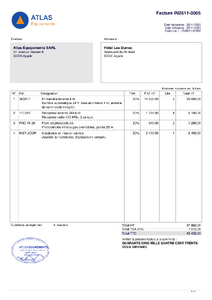
Invoice with the stamp
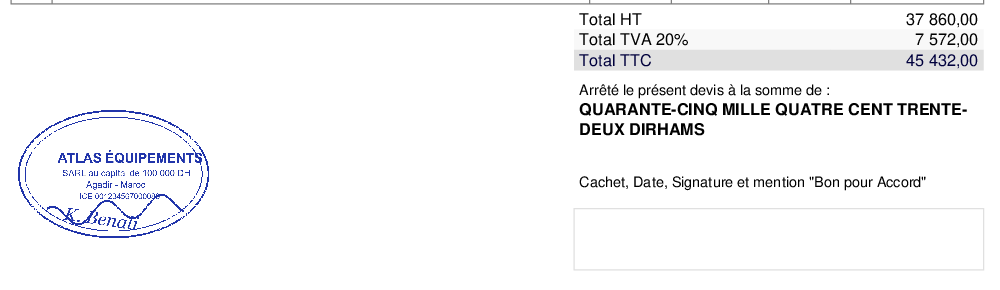
Stamp on a proposal
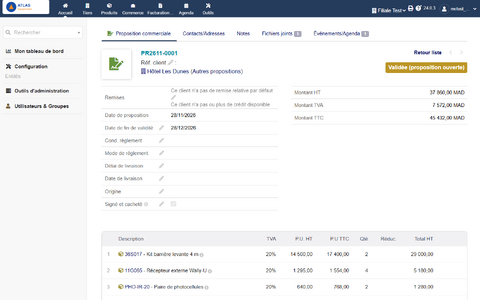
"Signed and stamped" box on the document
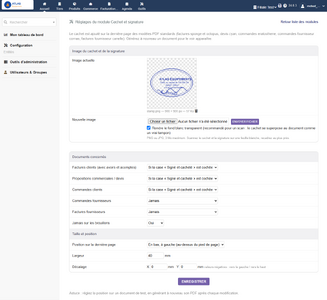
Setup page


Support
Questions before buying, installation or update issues: write to contact@agadir-informatique.ma. Purchase on the DoliStore.