Module CapCRM


Information
| Module name | CapCRM |
| Editor / Editeur | CAP-REL - www.cap-rel.fr |
| Download or buy page / Page achat ou téléchargement | External module - www.dolistore.com |
| Status / Statut / Estado | Stable |
| Prerequisites / Prérequis | Third parties, Invoices, Categories, Products, Services and Agenda modules
Dolibarr min version: See on Dolistore Dolibarr max version: See on Dolistore |
| Last update date / Date mise à jour fiche / Fecha última actualización | 2026-10-27 |
| Note / Nota | All of a customer's sales relationship on a single page, plus the tools to prospect: campaigns in a kanban, a pipeline per salesperson and follow-up alerts. |
Features
CapCRM gathers on one page everything Dolibarr knows about a third party: contacts, tags, invoices, proposals, orders, contracts, projects, tickets, interventions, exchange history and upcoming actions. Sales people and managers get a clear view of each customer without going through every Dolibarr screen.
At a glance
- Who it is for: sales people, sales managers and anyone who follows customers and prospects in Dolibarr.
- What it does: it reads the data already stored in Dolibarr, shows it as blocks on a single customer page, and adds prospecting tools (campaigns, pipeline, follow-up alerts).
- What it does not do: it sends none of your data to an outside service and replaces none of the Dolibarr modules it reads.
Feature list
- Customer card - contact details, address, email link, prospect potential and quick access to the Dolibarr card.
- Tags and categories - categories of the third party, with their colours.
- Contacts - contacts of the third party with direct edit, email and call actions.
- Sales blocks - unpaid invoices, yearly revenue chart, sales history by year and product category, proposals, orders, contracts, projects, tickets and interventions.
- Exchange history and upcoming actions - a timeline of emails, calls and meetings, with quick add of an exchange.
- Sales dashboard - proposal pipeline in a kanban, follow-up actions, unpaid invoices and dormant prospects.
- Prospecting view - list of third parties in a split view with configurable columns and the CapCRM card alongside.
- Prospecting campaigns - configurable stages, kanban, automatic progress by tags, prospect scoring, loss reasons, statistics and CSV export.
- Personal pipeline - every campaign of a salesperson in one dashboard, with hot prospects and stagnation alerts.
- Active follow-up - automatic follow-up alerts based on the last action, and detection of the temperature of the third party.
- Integrations - CapTodo tasks, one-click calls through CapCall, indirect sales, Dolibarr extra fields in each block.
- Seven languages - English, French, German, Spanish, Italian, Dutch and Brazilian Portuguese.
Screenshots
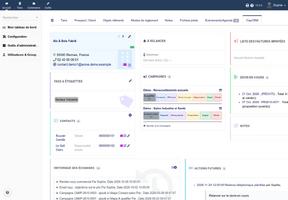
The CapCRM card of a third party
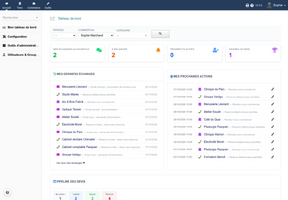
Sales dashboard
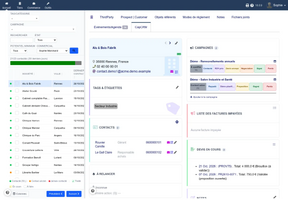
Prospecting view
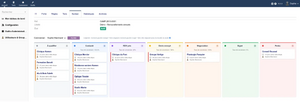
Campaign kanban
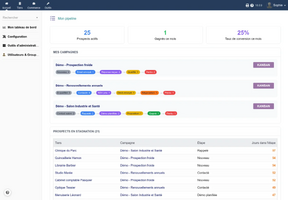
Personal pipeline
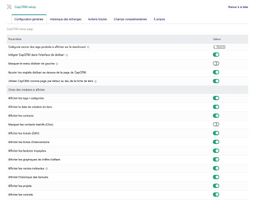
Module setup page


Links
- Module documentation
- What's new in version 1.2.10 (in French)
- Get update notifications
- Support form
- Public quality report
- Online demo: a Dolibarr with a full data set, created for you in less than 20 seconds and removed after the session
Requirements
| Item | Version or condition |
|---|---|
| Dolibarr | 18.0 or higher |
| PHP | 7.4 or higher |
| Dolibarr modules | Third parties, Invoices, Categories, Products, Services, Agenda |
| Rights | an administrator account to install, enable and set up the module |
Optional modules add blocks to the page: Tickets, Interventions, Projects, Contracts, Sales orders, CapTodo, CapCall and the CAP-REL indirect sales module.
Installation
- Download archive file of module (.zip file) from web site www.dolistore.com or from any other source.
- Install module into the /custom folder of Dolibarr:
- Go to Home - Setup - Modules - Deploy/install external app/module
- Upload the file. Note: If it fails because upload from this page has been locked by your web hosting provider, you can manually unzip the file into the /custom directory from command line: Go into the /custom directory and uncompress file with command unzip modulefile.zip then check that the directory with the nameof the module is inside the /custom directory. If into a subdirectory, just move it into /custom.
- Module should be ready to be activated and used.
Upgrade
- Install the new version through Home > Setup > Modules/Applications > Deploy/install external app/module.
- Disable then enable the module again: enabling applies the database upgrades and registers the new hooks and permissions.
Uninstall
Disable the module from Home > Setup > Modules/Applications.
Setup
To use this module, you must first enable it using an administrator account, via the menu option "Home - Setup - Modules".
Choose the tab where the module is listed. Then click on "Activate".
The module is now activated.
If a cog icon appears  on module thumb or at end of the line of the module, click on it to access the setup page specific to the module.
The setup is in Home > Setup > Modules > CapCRM. Its tabs cover the general setup (interface and blocks shown), the exchange history, the upcoming actions, the extra fields, the follow-up rules and the prospecting campaigns. Each block of the page can be enabled on its own, and list blocks accept a size limit and a status filter.
Permissions
CapCRM has fine-grained permissions: access to the module, then one permission per block (third parties and contacts, invoicing, proposals, projects, contracts, orders, tickets, interventions, own or all agendas), plus read, edit and delete rights on campaigns. A block shows only when it is enabled in the setup, the user holds its permission and the related Dolibarr module is enabled.
Usage
Open the CapCRM tab of any third party. The Commercial menu gains the entries Commercial Dashboard, Prospection, Campaigns, My pipeline and My recent exchanges. Each block is described in the user guide.
FAQ
All questions: documentation FAQ.
Development
Developments and improvements can be suggested to the project maintainer by email (see the headers of the source files) or through the support form.