Module Stancer


Information
| Module name | Stancer |
| Editor / Editeur | CAP-REL - www.cap-rel.fr |
| Download or buy page / Page achat ou téléchargement | External module - www.dolistore.com |
| Status / Statut / Estado | Stable |
| Prerequisites / Prérequis | Bank and Direct debit modules; a Stancer account
Dolibarr min version: See on Dolistore Dolibarr max version: See on Dolistore |
| Last update date / Date mise à jour fiche / Fecha última actualización | 2026-11-17 |
| Note / Nota | Card and SEPA direct debit payments from Dolibarr invoices, orders and quotes, through the French low-cost payment platform Stancer. |
Features
Stancer is the French low-cost payment platform. This module connects it to Dolibarr: your customers pay by card or by SEPA direct debit from their invoices, orders and quotes, and Dolibarr records the payment, classifies the invoice and books the bank entries without retyping anything.
At a glance
- Who it is for: companies and associations that bill their customers or members in Dolibarr and want to get paid online, by card or by direct debit.
- What it does: it sends payment links, collects card payments and SEPA direct debits through Stancer, then updates invoices, bank accounts and customers in Dolibarr.
- What it does not do: it does not replace your Stancer account (fees and contract are with Stancer), and it never debits a customer without a SEPA mandate.
Feature list
- Card payment - online payment link sent by email from an invoice, an order or a quote, secure 3-D Secure payment page, payment button on documents, card saved for the next payments, new attempt offered after a refused card.
- Quotes and orders - payment of a quote or an order with automatic invoice creation, partial payment and down payment invoice.
- SEPA direct debit - public page where the customer enters their own IBAN, SEPA mandate generated as a PDF, IBAN check through SEPAMail (France and Italy), automatic debit of due invoices after the customer notice period.
- Electronic signature of the mandate - with the UptoSign add-on module; once the mandate is signed, the customer's template invoices can switch to direct debit automatically.
- SEPA rejections - invoice reopened, customer and administrator notified with the reason, rejection fee invoiced if you wish.
- Tracking - dashboard, lists of payments, payouts, refunds and disputes synchronised with Stancer, Stancer tab on every thirdparty card.
- Automation - scheduled jobs for synchronisation, direct debits, invoices sent on validation and reminders; ready-to-use emails for every situation.
- Accounting - Stancer fees recorded on the bank account, payouts recorded as internal transfers to your main bank, detection and regularisation of discrepancies.
- Associations - online payment of membership fees and donations.
- Six languages - English, French, German, Spanish, Italian and Dutch.
Screenshots
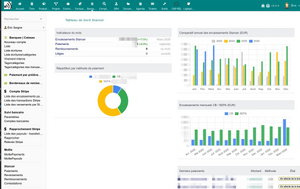
Stancer dashboard with the payment indicators of the current month
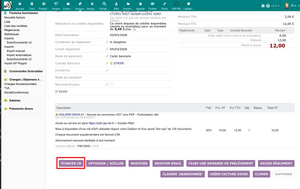
Stancer payment button on a validated invoice
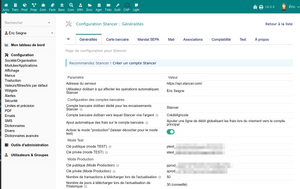
General setup: API keys, bank accounts and synchronisation
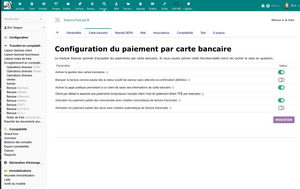
Card payment setup
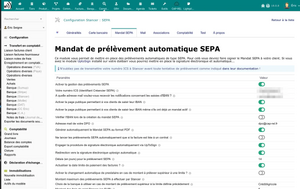
SEPA mandate setup
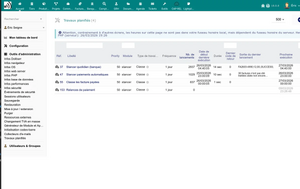
Stancer scheduled jobs


Links
- Module documentation
- What's new in version 2.0.28
- Get update notifications
- Support form
- Online demo: a Dolibarr created for you in less than 20 seconds; enter your own Stancer test keys in the module setup to go through the whole payment flow
Requirements
| Item | Version or condition |
|---|---|
| Dolibarr | 15.0 or higher |
| PHP | 7.4 or higher |
| Dolibarr modules | Bank and Direct debit enabled |
| Stancer | an account and its API keys, sign up on stancer.com |
| Rights | an administrator account to install, enable and set up the module |
Installation
- Download archive file of module (.zip file) from web site www.dolistore.com or from any other source.
- Install module into the /custom folder of Dolibarr:
- Go to Home - Setup - Modules - Deploy/install external app/module
- Upload the file. Note: If it fails because upload from this page has been locked by your web hosting provider, you can manually unzip the file into the /custom directory from command line: Go into the /custom directory and uncompress file with command unzip modulefile.zip then check that the directory with the nameof the module is inside the /custom directory. If into a subdirectory, just move it into /custom.
- Module should be ready to be activated and used.
On enabling, the module creates its tables, a STANCER bank account used as a transit account for the payments received, and the security token of the public payment pages.
Upgrade
- Back up your database.
- Install the new version through Home > Setup > Modules/Applications > Deploy/install external app/module.
- Disable then enable the module again: enabling applies the database upgrades and registers the new hooks and permissions.
Uninstall
Disable the module from Home > Setup > Modules/Applications. The data stays in the database: the STANCER bank account and its entries are not deleted.
Setup
To use this module, you must first enable it using an administrator account, via the menu option "Home - Setup - Modules".
Choose the tab where the module is listed. Then click on "Activate".
The module is now activated.
If a cog icon appears  on module thumb or at end of the line of the module, click on it to access the setup page specific to the module.
The setup is in Home > Setup > Modules > Stancer. The General tab holds the essential settings:
| Setting | Purpose |
|---|---|
| API keys | test keys (ptest_, stest_) and production keys (pprod_, sprod_), found in your Stancer dashboard
|
| Production mode | No: test payments, nothing is collected; Yes: real payments |
| Bank account for collections | transit account where payments are recorded, STANCER by default |
| Main bank account | account receiving the Stancer payouts, recorded as a transfer from the STANCER account |
| Fee recording | none, per payout or per payment |
| User for automated actions | Dolibarr account used to classify invoices, record bank entries and send emails |
| Number of days to synchronise | depth of the history fetched from Stancer, 31 days by default |
The other tabs set up card payment, SEPA direct debit (creditor identifier, notice period, rejection fees), emails, accounting and associations. Every setting is described in the setup guide.
Permissions
| Permission | Access |
|---|---|
| Read Stancer data | lists of payments, payouts, refunds and disputes |
| Create/modify Stancer data | refresh, refund, SEPA mandate management |
An administrator grants them from Home > Users & Groups, Permissions tab.
Usage
Getting paid by card
Validate an invoice, an order or a quote: a Stancer payment button appears on the document, and the payment link can be sent by email. The customer pays on the Stancer page, comes back to Dolibarr, and the invoice is classified as paid once Stancer confirms.
Setting up a SEPA direct debit
From the Stancer tab of the thirdparty, send the customer the link of the public IBAN page. The customer enters their IBAN, the mandate is generated as a PDF and can be signed electronically with UptoSign. Due invoices whose payment method is direct debit are then debited automatically, after the notice period.
Tracking
The Bank > Stancer menu gives the dashboard and the lists of payments, payouts, refunds and disputes. Synchronisation runs through the scheduled jobs, or on demand with the Refresh button of each list.
Each feature is described in the user guide.
FAQ
The module displays "API authentication error".
Stancer refused your keys. Check that public and private keys are not swapped, and that the mode (test or production) matches the keys entered.
Payouts do not appear in the list.
Stancer does not provide payouts in test mode. In production mode, click Refresh on the list.
A payment is recorded but the invoice is not classified as paid.
The payment may be partial, the option that classifies the invoice as paid after a card payment may be off, or the user for automated actions may lack rights on invoices.
The SEPA direct debit does not start.
Check that the StancerCheckTakePayments scheduled job is enabled and the Dolibarr cron runs, that the customer has an active mandate, that the notice period has passed and that the invoice uses the direct debit payment method.
How do I test without real payments?
Leave production mode off, enter your test keys and use the test cards provided by Stancer. When you switch to production, the Clean test data button removes the test payments.
All questions: documentation FAQ.
Development
Developments and improvements can be suggested to the project maintainer by email (see the headers of the source files) or through the support form.