Module DocFinder: Difference between revisions
Theopequiii (talk | contribs) (Documentation of the module (editor: Theo Pequignot)) |
PolyglotBot (talk | contribs) m (Adding interlang links (links to translated versions of this page in other languages) triggered by origin English page "Module_DocFinder_FR" update.) |
||
| Line 1: | Line 1: | ||
<!-- BEGIN interlang links --> | |||
<!-- Do NOT edit this section | |||
Links below are automatically managed by PolyglotBot | |||
You can edit links on the English source page : Module_DocFinder_FR --> | |||
<!-- END interlang links --> | |||
<!-- BEGIN origin interlang links --> | <!-- BEGIN origin interlang links --> | ||
<!-- You can edit this section but do NOT remove these comments | <!-- You can edit this section but do NOT remove these comments | ||
Revision as of 00:28, 2 October 2026

| Editor | Theo Pequignot (theopequignot.fr) |
|---|---|
| Module ID | 194154 |
| Version | 1.7.2 |
| Dolibarr | 16 to 24 |
| Where to get it | DoliStore |
| Support | contact@theopequignot.fr |
"The invoice with the lift pump", "that €2,400 quote for Martin & Co": in Dolibarr, finding that kind of document means stacking filters and opening records one by one. The native search doesn't look inside line items or notes. DocFinder adds a single search page that does.
What it does
- Searches every useful field: document number, customer name, line descriptions, product reference and label, public and private notes. Each field can be switched on or off.
- Amount filter: minimum and maximum, excl. or incl. tax, alone or combined with a keyword.
- Matching lines shown under each document, keyword highlighted, with quantity and net total. You see why a result comes up.
- Real status of each document, including partially paid invoices.
- Clickable examples taken from your recent data when the search is empty.
- Keyboard shortcut
/to jump back to the search, one click to open the record.
Settings
- Scope (quotes, invoices or both), searched fields, tax base, line display, maximum number of results.
- A "User access" card to grant or revoke the permission without opening each user card.
- Accent color of your choice, with live preview.
Security and comfort
- Each user only sees the documents they are allowed to read. Multicompany supported.
- 100% local: no dependency, no network call. Isolated CSS, your theme is left alone.
- Fully keyboard-usable, screen-reader labels, WCAG AA contrasts.
Installation
Home → Setup → Modules → "Deploy/install external app/module", upload the zip and enable DocFinder. The entry shows up in the top menu, ready to use.
Upgrading from a previous version: replace the files, then disable and re-enable the module (Setup → Modules). Settings, data and user permissions are kept.
Compatibility
- Dolibarr 16 to 24 (verified on 16, 22, 23 and 24).
- PHP 7.2 and above, MySQL / MariaDB.
- English and French included. Email support and updates for 2 years.
Screenshots
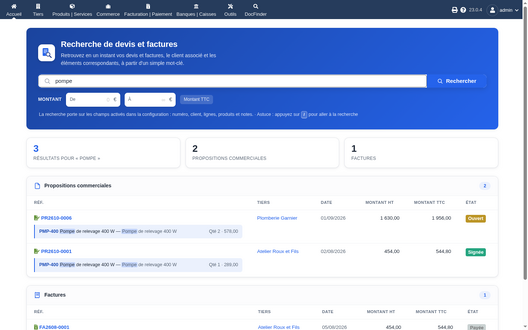
Keyword search with matching lines highlighted
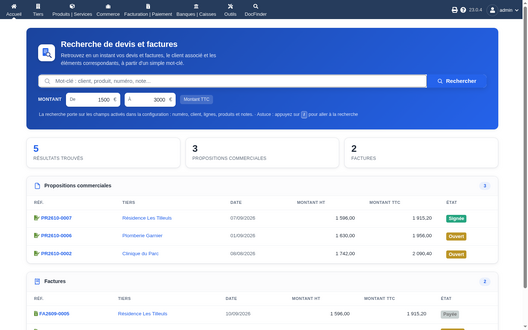
Amount filter
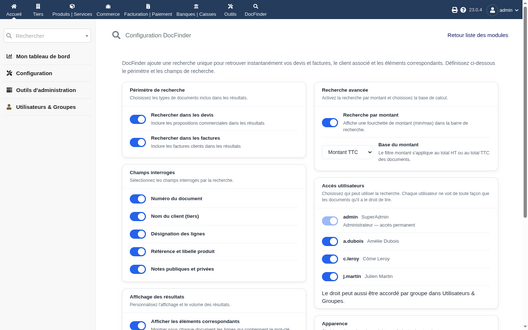
Settings page


Support
Questions before buying, installation or update issues: write to contact@theopequignot.fr. I am the developer of this module and I answer myself. Support and updates are included for 2 years with the DoliStore purchase.