Module CapCowork: Difference between revisions
Eric.seigne (talk | contribs) (new module coworking) Tag: 2017 source edit |
Eric.seigne (talk | contribs) (CapCowork 1.2.8) |
||
| (One intermediate revision by the same user not shown) | |||
| Line 1: | Line 1: | ||
[[fr:Module_CapCowork_FR]] | |||
[[Category:Complementary modules]] | [[Category:Complementary modules]] | ||
[[Category:CAP-REL]] | |||
[[Category:CapCowork]] | [[Category:CapCowork]] | ||
{{TemplateDocDevEn}} | |||
{{TemplateDocUser}} | |||
= | =Information= | ||
{{TemplateModuleInfo | {{TemplateModuleInfo | ||
|modulename=CapCowork | |modulename=CapCowork | ||
| Line 11: | Line 12: | ||
|webbuy={{LinkToPluginDownloadDoliStore|keyword=capcowork}} | |webbuy={{LinkToPluginDownloadDoliStore|keyword=capcowork}} | ||
|status=stable | |status=stable | ||
|prerequisites= | |prerequisites=Third parties, Products, Invoices and Sales orders modules (enabled along with CapCowork) | ||
|minversion=18.0.0 | |minversion=18.0.0 | ||
|note= | |note=Coworking space management inside Dolibarr: spaces, co-workers, bookings, subscriptions, check-in, credits, events, day passes, visitors and a public portal. | ||
}} | }} | ||
=Features= | |||
CapCowork runs a coworking space without leaving your ERP. Spaces, co-workers, bookings and subscriptions sit next to the third parties, products, orders and invoices you already have in Dolibarr, and a public portal shows your offer to future co-workers. | |||
==At a glance== | |||
* '''Who it is for''': coworking spaces, shared offices, third places and business centres that rent desks, offices and rooms. | |||
* '''What it does''': it records your spaces and co-workers, takes bookings with conflict detection, follows subscriptions, check-ins, prepaid credits, events, day passes and visitors, and publishes a storefront where visitors send booking requests. | |||
* '''What it does not do''': a request sent from the public portal never becomes a booking by itself, it is reviewed first; billing goes through the standard Dolibarr orders and invoices, which the module creates on request. | |||
==Feature list== | |||
* '''Spaces''' - hot desk, dedicated desk, private office, meeting room, phone booth and event space, with capacity, hourly, half-day, daily and monthly prices, buffer time, equipment and a photo. | |||
* '''Co-workers''' - linked to the Dolibarr third parties, with membership start and end dates; an expired membership is flagged. | |||
* '''Bookings''' - conflict detection that takes the buffer time of the space into account, generation of a sales order for prepayment, confirmation when the order is validated, and release of the slots nobody showed up for. | |||
* '''Recurring subscriptions''' - monthly amount, automatic renewal and renewal reminders. | |||
* '''Classified ads''' - between co-workers: available, wanted, exchange, with an expiry date. | |||
* '''Check-in and check-out''' - by hand or by scanning a QR code, with the list of people present. | |||
* '''Prepaid credits''' - credit wallets in hours or in money per co-worker. | |||
* '''Events''' - with a maximum number of attendees and co-worker replies (confirm, decline, maybe). | |||
* '''Day passes''' - full day, morning, afternoon or night, sold as a product of your catalog, with a printable QR code and an invoice on request. | |||
* '''Visitors''' - registration of the people who are not co-workers, with their host and their arrival and departure times. | |||
* '''Planning''' - bookings by space in day, week, month or list view. | |||
* '''Analytics''' - active co-workers, active subscriptions, monthly recurring revenue, bookings and check-ins of the period, most booked spaces. | |||
* '''Public portal''' - a themable storefront (four themes) with spaces, pricing, events, classified ads, a booking request form and a contact form; the requests arrive in Dolibarr. | |||
* '''Languages''' - interface in French, English, German, Spanish, Italian, Dutch and Brazilian Portuguese. | |||
==Screenshots== | |||
<gallery widths="300px" heights="200px"> | |||
File:CapCowork capcowork-accueil.png|CapCowork home page | |||
File:CapCowork capcowork-espaces.png|List of spaces with photo, type, capacity and prices | |||
File:CapCowork capcowork-planning.png|Planning of the bookings by space | |||
File:CapCowork capcowork-checkin.png|Check-in page: people present and day pass check-in | |||
File:CapCowork capcowork-pass-jour-fiche.png|Day pass card with its printable QR code | |||
File:CapCowork capcowork-analyses.png|Analytics dashboard | |||
File:CapCowork capcowork-portail-accueil.png|Home page of the public portal | |||
File:CapCowork capcowork-portail-espaces.png|Spaces of the public portal, filtered by type, capacity and keyword | |||
</gallery> | |||
=Links= | |||
* [https://doc.cap-rel.fr/capcowork/?lang=en Module documentation] | |||
* [https://doc.cap-rel.fr/capcowork/nouveautes-1-2-8 What's new in version 1.2.8] (in French) | |||
* [https://dolinews.com/en/projets/capcowork Get update notifications] | |||
* [https://cap-rel.fr/sav-module-dolibarr/ Support form] | |||
* [https://tests.cap-rel.fr/projects/21/quality Automated test report] | |||
* [https://dolitry.fr/capcowork/ Online demo]: a Dolibarr with a demonstration coworking space already filled in, created for you in less than 20 seconds and removed after the session | |||
=Requirements= | |||
{| class="wikitable" | |||
! Item !! Version or condition | |||
|- | |||
| Dolibarr || 18.0 or higher | |||
|- | |||
| PHP || 7.4 or higher | |||
|- | |||
| Rights || an administrator account to install, enable and set up the module | |||
|} | |||
Enabling CapCowork also enables the Dolibarr modules it relies on: | |||
{| class="wikitable" | |||
! Dolibarr module !! Used for | |||
|- | |||
| Third parties || every co-worker, booking, subscription and credit wallet is attached to a third party | |||
|- | |||
| Products || a day pass is sold as a product of the catalog | |||
|- | |||
| Sales orders || the order generated to prepay a booking | |||
|- | |||
| Invoices || the invoice of a day pass, and the billed status of the bookings | |||
|} | |||
=Installation= | |||
{{InstallModuleDoliStoreEn|keyword=capcowork}} | |||
==Upgrade== | |||
# Install the new version through '''Home > Setup > Modules/Applications > Deploy/install external app/module'''. | |||
# Disable then enable the module again: enabling applies the database upgrades and registers the new hooks and permissions. | |||
==Uninstall== | |||
Disable the module from '''Home > Setup > Modules/Applications'''. The data is not deleted. | |||
=Setup= | |||
{{ActivationModuleEn}} | |||
'''CapCowork''' | The setup is in '''Home > Setup > Modules > CapCowork'''. It has five tabs: '''Settings''', '''Place''', '''Public portal''', '''Demonstration data set''' and '''About'''. | ||
==Settings== | |||
= | {| class="wikitable" | ||
! Setting !! Purpose !! Default | |||
|- | |||
| Reference masks || numbering of spaces, co-workers, bookings, subscriptions, ads, credits, events and day passes || one mask per object | |||
|- | |||
| No-show grace period || minutes after which a booking nobody showed up for is released || 15 minutes | |||
|- | |||
| Classified ad expiry || lifetime of a classified ad || 30 days | |||
|- | |||
| Enable the public portal || opens the storefront to visitors; when off, every portal address answers "page not found" || yes | |||
|- | |||
| Auto-publish ads || publishes new classified ads without review || no | |||
|- | |||
| Notification emails || address told of each new booking, and address told of each new portal request || empty | |||
|} | |||
The buffer time between two bookings is set on each space. | |||
==Place== | |||
The '''Place''' tab holds the postal address of the coworking space, kept apart from the address of your company: name, address, phone, email, opening hours, access instructions, map and coordinates. This is the address the public portal shows; your invoices keep the company address. Empty fields fall back to the portal settings, then to your company card. | |||
==Public portal== | |||
The '''Public portal''' tab gives the address of the portal, the theme, the content of the storefront, the sections shown, the legal texts and the handling of requests. A space appears on the portal when it is active, published on the portal and not under maintenance. | |||
==Scheduled jobs== | |||
The module registers three scheduled jobs, disabled at install, to enable in '''Home > Setup > Scheduled jobs''': | |||
* expiry of classified ads (daily); | |||
* release of no-show bookings (every 15 minutes); | |||
* subscription renewal reminders (daily). | |||
==Demonstration data set== | |||
The '''Demonstration data set''' tab builds a place of about fifty client companies (co-workers, subscriptions, months of bookings dated from the day of the generation, day passes, visits, events) and can purge it again. It is meant for demonstrations, training sessions and acceptance testing: it refuses to act until the constant <code>CAPCOWORK_ALLOW_DEMO_DATA</code> is set to 1 (or <code>MAIN_FEATURES_LEVEL</code> to 2). | |||
= | =Permissions= | ||
* | Each part of the module has its own permissions, granted by an administrator from '''Home > Users & Groups''', '''Permissions''' tab: | ||
* | * spaces, co-workers, bookings and subscriptions: read, create/update, delete; | ||
* manage ads, manage billing, manage public portal requests, check-in/check-out, manage credits, manage events, manage day passes, manage visitors. | |||
The planning is shown to users who can read bookings, the analytics to users who can read spaces. | |||
=Usage= | |||
Once the module is enabled, a '''CapCowork''' menu appears in the top bar, with one entry per part of the module: spaces, co-workers, bookings, planning, subscriptions, classified ads, check-in, analytics, day passes, inquiries, events, visitors and credit wallets. | |||
== | ==Bookings and prepayment== | ||
Pick the space, the co-worker and the dates: the module checks for conflicts before saving. On the booking card, '''Generate order''' creates a sales order for the booking; validating the order confirms the booking, and paying the invoice marks it billed. A booking created as '''Prepaid''' gets its order at once. | |||
==Day passes== | |||
A day pass is the one-off access of someone who takes neither a subscription nor a booking. It is generated from a product of your catalog, which sets its price, and carries a QR code. At the front desk, the first scan records the arrival, the second the departure. From its card, the pass can be edited, cancelled, deleted or invoiced. | |||
= | ==Requests from the public portal== | ||
Booking requests, event registrations and contact messages sent from the portal arrive in '''CapCowork > Inquiries'''. From a request you can follow its status, create a prospect, open a booking form filled in from the request, or reply by email. | |||
Each screen is described in the [https://doc.cap-rel.fr/capcowork/utilisation?lang=en user guide] and the portal in its [https://doc.cap-rel.fr/capcowork/portail-public?lang=en own guide]. | |||
=FAQ= | |||
'''How do I avoid back-to-back bookings on the same space?'''<br> | |||
Set a buffer time on the space: the conflict check keeps that delay free between two bookings. | |||
'' | '''Why does generating a day pass require a product?'''<br> | ||
The pass is sold as a service of your catalog: that link gives it its price and lets you invoice it. Create a service on sale (for example "Day pass") in '''Products/Services''', it then appears in the generation form. | |||
'''A space does not show on the public portal.'''<br> | |||
It must be active, published on the portal and not under maintenance, and the public portal must be enabled in the setup. | |||
'''No-show bookings are not released.'''<br> | |||
Enable the CapCowork scheduled jobs in '''Home > Setup > Scheduled jobs'''. | |||
All questions: [https://doc.cap-rel.fr/capcowork/faq?lang=en documentation FAQ]. | |||
= | =Development= | ||
Developments and improvements can be suggested to the project maintainer by email (see the headers of the source files) or through the [https://cap-rel.fr/sav-module-dolibarr/ support form]. | |||
Latest revision as of 16:30, 27 October 2026


Information
| Module name | CapCowork |
| Editor / Editeur | CAP-REL - cap-rel.fr |
| Download or buy page / Page achat ou téléchargement | External module - www.dolistore.com |
| Status / Statut / Estado | Stable |
| Prerequisites / Prérequis | Third parties, Products, Invoices and Sales orders modules (enabled along with CapCowork)
Dolibarr min version: See on Dolistore Dolibarr max version: See on Dolistore |
| Last update date / Date mise à jour fiche / Fecha última actualización | 2026-10-27 |
| Note / Nota | Coworking space management inside Dolibarr: spaces, co-workers, bookings, subscriptions, check-in, credits, events, day passes, visitors and a public portal. |
Features
CapCowork runs a coworking space without leaving your ERP. Spaces, co-workers, bookings and subscriptions sit next to the third parties, products, orders and invoices you already have in Dolibarr, and a public portal shows your offer to future co-workers.
At a glance
- Who it is for: coworking spaces, shared offices, third places and business centres that rent desks, offices and rooms.
- What it does: it records your spaces and co-workers, takes bookings with conflict detection, follows subscriptions, check-ins, prepaid credits, events, day passes and visitors, and publishes a storefront where visitors send booking requests.
- What it does not do: a request sent from the public portal never becomes a booking by itself, it is reviewed first; billing goes through the standard Dolibarr orders and invoices, which the module creates on request.
Feature list
- Spaces - hot desk, dedicated desk, private office, meeting room, phone booth and event space, with capacity, hourly, half-day, daily and monthly prices, buffer time, equipment and a photo.
- Co-workers - linked to the Dolibarr third parties, with membership start and end dates; an expired membership is flagged.
- Bookings - conflict detection that takes the buffer time of the space into account, generation of a sales order for prepayment, confirmation when the order is validated, and release of the slots nobody showed up for.
- Recurring subscriptions - monthly amount, automatic renewal and renewal reminders.
- Classified ads - between co-workers: available, wanted, exchange, with an expiry date.
- Check-in and check-out - by hand or by scanning a QR code, with the list of people present.
- Prepaid credits - credit wallets in hours or in money per co-worker.
- Events - with a maximum number of attendees and co-worker replies (confirm, decline, maybe).
- Day passes - full day, morning, afternoon or night, sold as a product of your catalog, with a printable QR code and an invoice on request.
- Visitors - registration of the people who are not co-workers, with their host and their arrival and departure times.
- Planning - bookings by space in day, week, month or list view.
- Analytics - active co-workers, active subscriptions, monthly recurring revenue, bookings and check-ins of the period, most booked spaces.
- Public portal - a themable storefront (four themes) with spaces, pricing, events, classified ads, a booking request form and a contact form; the requests arrive in Dolibarr.
- Languages - interface in French, English, German, Spanish, Italian, Dutch and Brazilian Portuguese.
Screenshots
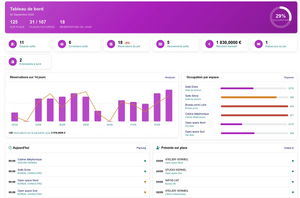
CapCowork home page
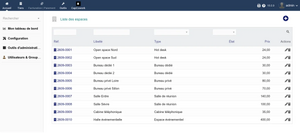
List of spaces with photo, type, capacity and prices
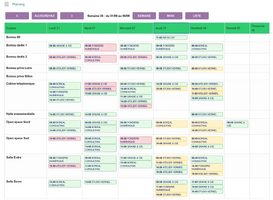
Planning of the bookings by space
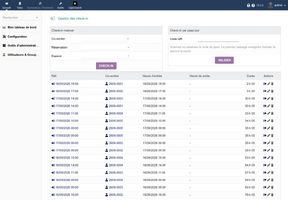
Check-in page: people present and day pass check-in
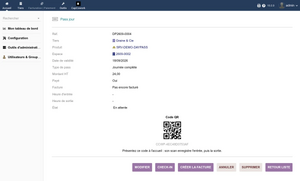
Day pass card with its printable QR code
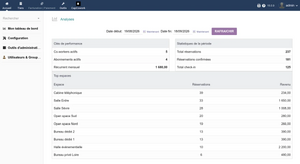
Analytics dashboard
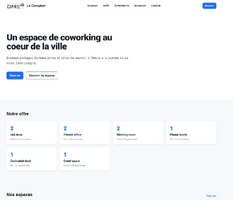
Home page of the public portal
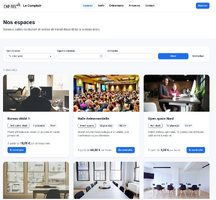
Spaces of the public portal, filtered by type, capacity and keyword


Links
- Module documentation
- What's new in version 1.2.8 (in French)
- Get update notifications
- Support form
- Automated test report
- Online demo: a Dolibarr with a demonstration coworking space already filled in, created for you in less than 20 seconds and removed after the session
Requirements
| Item | Version or condition |
|---|---|
| Dolibarr | 18.0 or higher |
| PHP | 7.4 or higher |
| Rights | an administrator account to install, enable and set up the module |
Enabling CapCowork also enables the Dolibarr modules it relies on:
| Dolibarr module | Used for |
|---|---|
| Third parties | every co-worker, booking, subscription and credit wallet is attached to a third party |
| Products | a day pass is sold as a product of the catalog |
| Sales orders | the order generated to prepay a booking |
| Invoices | the invoice of a day pass, and the billed status of the bookings |
Installation
- Download archive file of module (.zip file) from web site www.dolistore.com or from any other source.
- Install module into the /custom folder of Dolibarr:
- Go to Home - Setup - Modules - Deploy/install external app/module
- Upload the file. Note: If it fails because upload from this page has been locked by your web hosting provider, you can manually unzip the file into the /custom directory from command line: Go into the /custom directory and uncompress file with command unzip modulefile.zip then check that the directory with the nameof the module is inside the /custom directory. If into a subdirectory, just move it into /custom.
- Module should be ready to be activated and used.
Upgrade
- Install the new version through Home > Setup > Modules/Applications > Deploy/install external app/module.
- Disable then enable the module again: enabling applies the database upgrades and registers the new hooks and permissions.
Uninstall
Disable the module from Home > Setup > Modules/Applications. The data is not deleted.
Setup
To use this module, you must first enable it using an administrator account, via the menu option "Home - Setup - Modules".
Choose the tab where the module is listed. Then click on "Activate".
The module is now activated.
If a cog icon appears  on module thumb or at end of the line of the module, click on it to access the setup page specific to the module.
The setup is in Home > Setup > Modules > CapCowork. It has five tabs: Settings, Place, Public portal, Demonstration data set and About.
Settings
| Setting | Purpose | Default |
|---|---|---|
| Reference masks | numbering of spaces, co-workers, bookings, subscriptions, ads, credits, events and day passes | one mask per object |
| No-show grace period | minutes after which a booking nobody showed up for is released | 15 minutes |
| Classified ad expiry | lifetime of a classified ad | 30 days |
| Enable the public portal | opens the storefront to visitors; when off, every portal address answers "page not found" | yes |
| Auto-publish ads | publishes new classified ads without review | no |
| Notification emails | address told of each new booking, and address told of each new portal request | empty |
The buffer time between two bookings is set on each space.
Place
The Place tab holds the postal address of the coworking space, kept apart from the address of your company: name, address, phone, email, opening hours, access instructions, map and coordinates. This is the address the public portal shows; your invoices keep the company address. Empty fields fall back to the portal settings, then to your company card.
Public portal
The Public portal tab gives the address of the portal, the theme, the content of the storefront, the sections shown, the legal texts and the handling of requests. A space appears on the portal when it is active, published on the portal and not under maintenance.
Scheduled jobs
The module registers three scheduled jobs, disabled at install, to enable in Home > Setup > Scheduled jobs:
- expiry of classified ads (daily);
- release of no-show bookings (every 15 minutes);
- subscription renewal reminders (daily).
Demonstration data set
The Demonstration data set tab builds a place of about fifty client companies (co-workers, subscriptions, months of bookings dated from the day of the generation, day passes, visits, events) and can purge it again. It is meant for demonstrations, training sessions and acceptance testing: it refuses to act until the constant CAPCOWORK_ALLOW_DEMO_DATA is set to 1 (or MAIN_FEATURES_LEVEL to 2).
Permissions
Each part of the module has its own permissions, granted by an administrator from Home > Users & Groups, Permissions tab:
- spaces, co-workers, bookings and subscriptions: read, create/update, delete;
- manage ads, manage billing, manage public portal requests, check-in/check-out, manage credits, manage events, manage day passes, manage visitors.
The planning is shown to users who can read bookings, the analytics to users who can read spaces.
Usage
Once the module is enabled, a CapCowork menu appears in the top bar, with one entry per part of the module: spaces, co-workers, bookings, planning, subscriptions, classified ads, check-in, analytics, day passes, inquiries, events, visitors and credit wallets.
Bookings and prepayment
Pick the space, the co-worker and the dates: the module checks for conflicts before saving. On the booking card, Generate order creates a sales order for the booking; validating the order confirms the booking, and paying the invoice marks it billed. A booking created as Prepaid gets its order at once.
Day passes
A day pass is the one-off access of someone who takes neither a subscription nor a booking. It is generated from a product of your catalog, which sets its price, and carries a QR code. At the front desk, the first scan records the arrival, the second the departure. From its card, the pass can be edited, cancelled, deleted or invoiced.
Requests from the public portal
Booking requests, event registrations and contact messages sent from the portal arrive in CapCowork > Inquiries. From a request you can follow its status, create a prospect, open a booking form filled in from the request, or reply by email.
Each screen is described in the user guide and the portal in its own guide.
FAQ
How do I avoid back-to-back bookings on the same space?
Set a buffer time on the space: the conflict check keeps that delay free between two bookings.
Why does generating a day pass require a product?
The pass is sold as a service of your catalog: that link gives it its price and lets you invoice it. Create a service on sale (for example "Day pass") in Products/Services, it then appears in the generation form.
A space does not show on the public portal.
It must be active, published on the portal and not under maintenance, and the public portal must be enabled in the setup.
No-show bookings are not released.
Enable the CapCowork scheduled jobs in Home > Setup > Scheduled jobs.
All questions: documentation FAQ.
Development
Developments and improvements can be suggested to the project maintainer by email (see the headers of the source files) or through the support form.