Module Charges PMP: Difference between revisions
(New page: Module Charges PMP (Weglob module documentation)) |
(Version 3.2.1) |
||
| Line 26: | Line 26: | ||
| Status || Stable | | Status || Stable | ||
|- | |- | ||
| Version || 3.2. | | Version || 3.2.1 | ||
|- | |- | ||
| Module ID || 500050 | | Module ID || 500050 | ||
Latest revision as of 16:33, 12 November 2026

| Module name | PMPCharges |
| Editor / Editeur | Weglob - https://weglob.com |
| Download or buy page / Page achat ou téléchargement | External module - https://www.dolistore.com/product.php?id=2867 |
| Status / Statut / Estado | Stable |
| Prerequisites / Prérequis | Stock, Products and Suppliers modules enabled
Dolibarr min version: See on Dolistore Dolibarr max version: See on Dolistore |
| Last update date / Date mise à jour fiche / Fecha última actualización | 2026-11-12 |
| Note / Nota | Module ID 500050 |
Module Charges PMP (PMPCharges)
| Name | Value |
|---|---|
| Publisher | Weglob |
| Status | Stable |
| Version | 3.2.1 |
| Module ID | 500050 |
| Dolibarr compatibility | 20.0 and later |
| License | GPL v3 or later |
| Languages | English, French |
Description
Charges PMP adds extra purchase costs (transport, customs, other fees) into the weighted average price (PMP) of products when supplier goods enter the stock.
Without this module, Dolibarr computes the PMP from the purchase price only. With it, the landed cost is spread over the received products, so your stock value and margins reflect the real cost.
The module stays aligned with the native Dolibarr stock logic:
- the charges are applied at the real stock movement (STOCK_MOVEMENT event);
- they are entered on the document that matches your stock mode;
- they are locked once applied;
- they are restored if the stock movement is reversed.
Features
- Enter charges from the supplier order, supplier invoice or reception, depending on your stock setup.
- Pick the charge invoices (transport, customs...) from a searchable list of supplier invoices, filtered by entity.
- "Calculate PMP" button: preview the result before the stock movement.
- Allocation of charges by quantity, value or equal share.
- Option to also update the product cost price.
- Protection against double application.
- Rollback: reception set back to draft or reopened, supplier invoice set back to draft, supplier order set back to draft (with reverse stock movement).
- Multi-company compatible.
- Dedicated permissions.
Calculation rule
Dolibarr first computes the standard PMP on the stock entry. The module then adds the charge:
corrected PMP = PMP after movement + (allocated charge / real stock after movement)
This keeps partial receptions and successive documents consistent, without restarting from the initial purchase price.
Supported stock modes
| Active Dolibarr option | Document where charges are entered | Automatic application |
|---|---|---|
| STOCK_CALCULATE_ON_SUPPLIER_VALIDATE_ORDER | Supplier order | On approval |
| STOCK_CALCULATE_ON_SUPPLIER_BILL | Supplier invoice | On validation |
| STOCK_CALCULATE_ON_RECEPTION | Reception | On validation |
| STOCK_CALCULATE_ON_RECEPTION_CLOSE | Reception | On closing |
The mode STOCK_CALCULATE_ON_SUPPLIER_DISPATCH_ORDER is not supported.
Screenshots
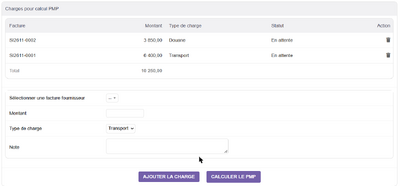
Charges entered on a supplier invoice

PMP preview before the stock movement


Installation
- Buy and download the module zip from DoliStore.
- Go to Home > Setup > Modules/Applications > Deploy/install external module and upload the zip.
- Or unzip it manually into htdocs/custom/ so you get htdocs/custom/pmpcharges.
- Enable the PMPCharges module.
Configuration
- Open Setup > Modules/Applications > PMPCharges > Setup.
- Choose the charge allocation type: quantity, value or equal.
- Choose whether to update the product cost price (yes/no).
- Check your supplier stock entry mode in Setup > Stock.
Permissions
- Read PMP charges
- Create/modify PMP charges
- Delete PMP charges
- Calculate PMP (preview)
Quick check
- Create a supplier document with products (according to your stock mode).
- Add one or more charges in the PMPCharges block.
- Click Calculate PMP to preview.
- Validate the document: the stock movement applies the corrected PMP and locks the charges.
FAQ
- I cannot edit the charges any more
- They are locked after application. Reverse the stock movement (for example set the reception back to draft) to unlock them.
- The charges block does not appear
- The block is shown on the document that matches the active stock mode only. Check Setup > Stock.
- Does it change the PMP of products already in stock?
- Only through the formula above, for the products of the movement concerned.
Support
- Email: contact@weglob.com
- Website: weglob.com
- LinkedIn: Mohamed Aggoubi