Module AIRA BI: Difference between revisions
(New page: Module AIRA BI (Weglob module documentation)) |
(Version 1.4.3) |
||
| Line 26: | Line 26: | ||
| Status || Stable | | Status || Stable | ||
|- | |- | ||
| Version || 1.4. | | Version || 1.4.3 | ||
|- | |- | ||
| Module ID || 500100 | | Module ID || 500100 | ||
Latest revision as of 16:33, 12 November 2026

| Module name | AIRA BI |
| Editor / Editeur | Weglob - https://weglob.com |
| Download or buy page / Page achat ou téléchargement | External module - https://www.dolistore.com/product.php?id=2841 |
| Status / Statut / Estado | Stable |
| Prerequisites / Prérequis | Dolibarr 19.0+, PHP 8.0+, an AI provider API key
Dolibarr min version: See on Dolistore Dolibarr max version: See on Dolistore |
| Last update date / Date mise à jour fiche / Fecha última actualización | 2026-11-12 |
| Note / Nota | Module ID 500100 |
Module AIRA BI
| Name | Value |
|---|---|
| Publisher | Weglob |
| Status | Stable |
| Version | 1.4.3 |
| Module ID | 500100 |
| Dolibarr compatibility | 19.0 and later |
| License | GPL v3 or later |
| Languages | English, French |
Description
AIRA BI is an AI assistant built into Dolibarr. Users ask questions about their ERP data in plain language and get the answer as text, a table or a chart.
Example questions:
- sales by month over 6 months
- top 10 customers by revenue
- unpaid invoices by customer
- bank account balances
- projects by status
The engine follows a controlled flow: question → schema context → AI plan → validation → read-only SQL → display in the chat. It is a Dolibarr assistant, not a general-purpose chatbot.
Features
- Answers as text, table or chart depending on the question.
- Conversation memory: follow-up questions, refine a filter, ask for another view.
- Conversations saved per user and per entity, reopen or delete them from the sidebar.
- Links to native reports (customreports.php) when the result matches a Dolibarr report.
- Starter suggestions on the welcome screen, shown only when the user has the required rights.
- Help on Dolibarr usage ("how do I create an invoice?") without reading the database.
- Choice of AI provider: OpenRouter (hundreds of models, some free), OpenAI, Google Gemini, NVIDIA.
- Clear error messages (provider, model, technical error) when the AI API fails.
Security
Every query goes through a SQL guard:
- SELECT only, a single statement, no comments or variables.
- No write queries, no export (INTO OUTFILE), no system schemas.
- Whitelist of business tables: each table needs the matching Dolibarr module and the user's permission (e.g. invoices require "Read invoices").
- Sensitive columns are blocked (passwords, API keys, tokens).
- entity filter enforced (multi-company safe).
- Row count and execution time are capped.
- Runs in a read-only transaction, or with a read-only MySQL user (recommended).
API keys and the read-only MySQL password are encrypted in the database and never displayed again.
Privacy
Sent to the AI provider: the question, the conversation history and the description of the allowed tables. Query results are not sent. Free offers (OpenRouter :free models, Gemini free tier, NVIDIA trial credits) may log prompts: prefer a paid offer for sensitive data.
Screenshots
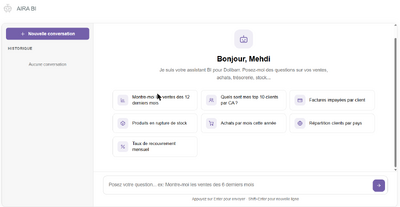
Welcome screen with suggestions
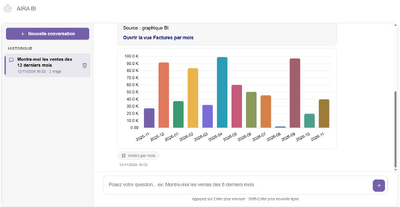
Answer as a chart: sales by month
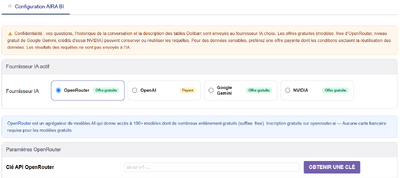
Setup: choice of AI provider


Installation
- Buy and download the module zip from DoliStore.
- Go to Home > Setup > Modules/Applications > Deploy/install external module and upload the zip.
- Or unzip it manually into htdocs/custom/ so you get htdocs/custom/aichat.
Configuration
- Enable the AIRA BI module.
- Open the module setup page.
- Choose the provider: OpenRouter, OpenAI, Google Gemini or NVIDIA.
- Enter the API key (a "Get a key" button opens the provider page).
- Choose the model. For OpenRouter, the list comes from the live catalog with prices and context size; a warning is shown if the configured model was removed.
- Save.
- Optional but recommended: create a read-only MySQL user and enter it in the setup:
CREATE USER 'dolibarr_ro'@'localhost' IDENTIFIED BY 'password';
GRANT SELECT ON dolibarr.* TO 'dolibarr_ro'@'localhost';
- Optional: enable the Dolibarr BI / reports feature to get customreports links in the chat.
The Dolibarr server must reach the provider API over HTTPS (PHP curl.cainfo set with root certificates).
FAQ
- The assistant answers with an AI error
- Check the API key, the quota and that the model is still available. The message shows the provider and model in use.
- "No data found"
- No Dolibarr record matches. Change the period or the filter.
- A user does not see some suggestions or gets a refusal
- The user lacks the Dolibarr permission on the module behind that data (invoices, orders, bank...). This is intended.
- Can it modify my data?
- No. Only read-only SELECT queries are allowed.
Support
- Email: contact@weglob.com
- Website: weglob.com
- LinkedIn: Mohamed Aggoubi