Complementary attributes: Difference between revisions
Jump to navigation
Jump to search

mNo edit summary Tag: 2017 source edit |
mNo edit summary Tag: 2017 source edit |
||
| Line 1: | Line 1: | ||
{{TemplateDocUser}} | {{TemplateDocUser}} | ||
=Introduction= | =Introduction= | ||
Most of the Dolibarr modules have the possibilities to enhance the standard fields by new users | Most of the Dolibarr modules have the possibilities to enhance the standard fields by new users fields. These fields are called "Complementary attributes" can be defined for objects or object lines. | ||
=How to use= | |||
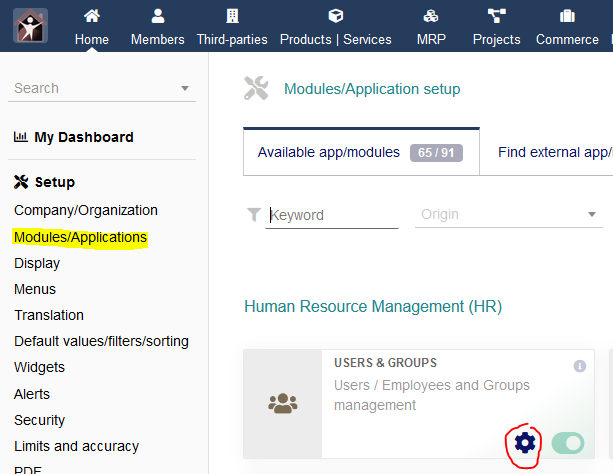
Go to the parameters of the module where you want to create new user fileds | |||
[[File:Module configuration.png|center]] | |||
On the configuration page, select the complementary attribute menu | |||
[[File:Complementary attribute menu.png|center]] | |||
Then click on **New Attribute** | |||
Revision as of 14:55, 22 December 2021

Introduction
Most of the Dolibarr modules have the possibilities to enhance the standard fields by new users fields. These fields are called "Complementary attributes" can be defined for objects or object lines.
How to use
Go to the parameters of the module where you want to create new user fileds

On the configuration page, select the complementary attribute menu

Then click on **New Attribute**